[jekyll] jekyll install
개요
오랫동안 방치했던 블로그를 다시 열면서
jekyll를 다시 설치해봤습니다.
설치
jekyll 프로젝트로 이동하여 아래 명령어를 입력합니다.
gem install jekyll bundlerFetching pathutil-0.16.2.gem
Fetching terminal-table-3.0.2.gem
Fetching webrick-1.8.1.gem
Fetching forwardable-extended-2.6.0.gem
Fetching rouge-4.1.3.gem
Fetching mercenary-0.4.0.gem
Fetching safe_yaml-1.0.5.gem
Fetching unicode-display_width-2.4.2.gem
Fetching liquid-4.0.4.gem
Fetching kramdown-2.4.0.gem
Fetching kramdown-parser-gfm-1.1.0.gem
Fetching ffi-1.15.5.gem
Fetching rb-inotify-0.10.1.gem
Fetching rb-fsevent-0.11.2.gem
Fetching listen-3.8.0.gem
Fetching jekyll-watch-2.2.1.gem
Fetching google-protobuf-3.24.2-arm64-darwin.gem
Fetching sass-embedded-1.66.1-x86_64-darwin.gem
Fetching jekyll-sass-converter-3.0.0.gem
Fetching concurrent-ruby-1.2.2.gem
Fetching i18n-1.14.1.gem
Fetching http_parser.rb-0.8.0.gem
Fetching eventmachine-1.2.7.gem
Fetching em-websocket-0.5.3.gem
Fetching colorator-1.1.0.gem
Fetching public_suffix-5.0.3.gem
Fetching addressable-2.8.5.gem
Fetching jekyll-4.3.2.gem
ERROR: While executing gem ... (Gem::FilePermissionError)
You don't have write permissions for the /Library/Ruby/Gems/2.6.0 directory.웁스. 권한 문제가 발생했네요.
맥북 기본 설치된 ruby를 사용하다보니 해당 디렉토리 권한이 없다고 합니다.
이럴 때는 sudo..아니아니 rbenv부터 찬찬히 해봅시다.
참고 : https://jojoldu.tistory.com/288
rbenv
rbenv를 설치해봅시다.
brew update
brew install rbenv ruby-build
rbenv 설치가 잘됐는지.. 확인도 해보죠.
rbenv versions
* system
system. 즉 os에서 기본 제공하는 ruby를 사용하고 있네요.
아마 버전도 상당히 낮은 ruby를 사용하고 있을꺼라 예상되네요.
이제 직접 ruby를 설치해봅시다.
당시 이 글에서 사용한 Ruby는 3.2.2입니다. 현재 최신 버전이라는 뜻은 아니며 프로젝트가 지원하는 Ruby 버전을 선택해야 합니다.
rbenv install 3.2.2
To follow progress, use 'tail -f /var/folders/2_/8rvvvv_533d_dzj5y82h6lj00000gn/T/ruby-build.20230904230149.5486.log' or pass --verbose
Downloading openssl-3.1.1.tar.gz...
-> https://dqw8nmjcqpjn7.cloudfront.net/b3aa61334233b852b63ddb048df181177c2c659eb9d4376008118f9c08d07674
Installing openssl-3.1.1...
Installed openssl-3.1.1 to /.rbenv/versions/3.2.2

Downloading ruby-3.2.2.tar.gz...
-> https://cache.ruby-lang.org/pub/ruby/3.2/ruby-3.2.2.tar.gz
Installing ruby-3.2.2...
ruby-build: using readline from homebrew
ruby-build: using libyaml from homebrew
Installed ruby-3.2.2 to /.rbenv/versions/3.2.2


NOTE: to activate this Ruby version as the new default, run: rbenv global 3.2.2
가장 밑에 note를 보면 새로운 ruby를 설치했으니 default로 셋팅하라고 합니다.
따라해보겠습니다.
rbenv global 3.2.2다시 버전을 확인해 보면?
rbenv versions
  system
* 3.2.2 (set by /.rbenv/version)
깔끔하게 잘 됐네요.
이제 path에 추가하여 어디서든 ruby 명령어를 사용해봅시다.
vim ~/.zshrc

# 아래 코드 추가
[[ -d ~/.rbenv  ]] && \
  export PATH=${HOME}/.rbenv/bin:${PATH} && \
  eval "$(rbenv init -)"

# source 명령어로 적용
source ~/.zshrc
자.. 드디어 모든 준비가 끝났습니다.
이제 bundler를 설치합니다.
bundler
gem install bundler
Fetching bundler-2.4.19.gem
Successfully installed bundler-2.4.19
Parsing documentation for bundler-2.4.19
Installing ri documentation for bundler-2.4.19
Done installing documentation for bundler after 0 seconds
1 gem installed

A new release of RubyGems is available: 3.4.10 → 3.4.19!
Run `gem update --system 3.4.19` to update your installation.
아직 마지막 관문이 남아 있습니다.
gem install jekyll bundler
Fetching unicode-display_width-2.4.2.gem
Fetching terminal-table-3.0.2.gem
Fetching safe_yaml-1.0.5.gem
Fetching rouge-4.1.3.gem
Fetching forwardable-extended-2.6.0.gem
Fetching mercenary-0.4.0.gem
Fetching webrick-1.8.1.gem
Fetching pathutil-0.16.2.gem
Fetching liquid-4.0.4.gem
Fetching kramdown-2.4.0.gem
Fetching kramdown-parser-gfm-1.1.0.gem
Fetching ffi-1.15.5.gem
Fetching rb-inotify-0.10.1.gem
Fetching rb-fsevent-0.11.2.gem
Fetching listen-3.8.0.gem
Fetching jekyll-watch-2.2.1.gem
Fetching google-protobuf-3.24.2-arm64-darwin.gem
Fetching sass-embedded-1.66.1-arm64-darwin.gem
Fetching jekyll-sass-converter-3.0.0.gem
Fetching concurrent-ruby-1.2.2.gem
Fetching i18n-1.14.1.gem
Fetching http_parser.rb-0.8.0.gem
Fetching eventmachine-1.2.7.gem
Fetching em-websocket-0.5.3.gem
Fetching jekyll-4.3.2.gem
Fetching colorator-1.1.0.gem
Fetching public_suffix-5.0.3.gem
Fetching addressable-2.8.5.gem
Successfully installed webrick-1.8.1
Successfully installed unicode-display_width-2.4.2
Successfully installed terminal-table-3.0.2
Successfully installed safe_yaml-1.0.5
Successfully installed rouge-4.1.3
Successfully installed forwardable-extended-2.6.0
Successfully installed pathutil-0.16.2
Successfully installed mercenary-0.4.0
Successfully installed liquid-4.0.4
Successfully installed kramdown-2.4.0
Successfully installed kramdown-parser-gfm-1.1.0
Building native extensions. This could take a while...
Successfully installed ffi-1.15.5
Successfully installed rb-inotify-0.10.1
Successfully installed rb-fsevent-0.11.2
Successfully installed listen-3.8.0
Successfully installed jekyll-watch-2.2.1
Successfully installed google-protobuf-3.24.2-arm64-darwin
Successfully installed sass-embedded-1.66.1-arm64-darwin
Successfully installed jekyll-sass-converter-3.0.0
Successfully installed concurrent-ruby-1.2.2
Successfully installed i18n-1.14.1
Building native extensions. This could take a while...
Successfully installed http_parser.rb-0.8.0
Building native extensions. This could take a while...
Successfully installed eventmachine-1.2.7
Successfully installed em-websocket-0.5.3
Successfully installed colorator-1.1.0
Successfully installed public_suffix-5.0.3
Successfully installed addressable-2.8.5
Successfully installed jekyll-4.3.2
Parsing documentation for webrick-1.8.1
Installing ri documentation for webrick-1.8.1
Parsing documentation for unicode-display_width-2.4.2
Installing ri documentation for unicode-display_width-2.4.2
Parsing documentation for terminal-table-3.0.2
Installing ri documentation for terminal-table-3.0.2
Parsing documentation for safe_yaml-1.0.5
Installing ri documentation for safe_yaml-1.0.5
Parsing documentation for rouge-4.1.3
Installing ri documentation for rouge-4.1.3
Parsing documentation for forwardable-extended-2.6.0
Installing ri documentation for forwardable-extended-2.6.0
Parsing documentation for pathutil-0.16.2
Installing ri documentation for pathutil-0.16.2
Parsing documentation for mercenary-0.4.0
Installing ri documentation for mercenary-0.4.0
Parsing documentation for liquid-4.0.4
Installing ri documentation for liquid-4.0.4
Parsing documentation for kramdown-2.4.0
Installing ri documentation for kramdown-2.4.0
Parsing documentation for kramdown-parser-gfm-1.1.0
Installing ri documentation for kramdown-parser-gfm-1.1.0
Parsing documentation for ffi-1.15.5
Installing ri documentation for ffi-1.15.5
Parsing documentation for rb-inotify-0.10.1
Installing ri documentation for rb-inotify-0.10.1
Parsing documentation for rb-fsevent-0.11.2
Installing ri documentation for rb-fsevent-0.11.2
Parsing documentation for listen-3.8.0
Installing ri documentation for listen-3.8.0
Parsing documentation for jekyll-watch-2.2.1
Installing ri documentation for jekyll-watch-2.2.1
Parsing documentation for google-protobuf-3.24.2-arm64-darwin
Installing ri documentation for google-protobuf-3.24.2-arm64-darwin
Parsing documentation for sass-embedded-1.66.1-arm64-darwin
Installing ri documentation for sass-embedded-1.66.1-arm64-darwin
Parsing documentation for jekyll-sass-converter-3.0.0
Installing ri documentation for jekyll-sass-converter-3.0.0
Parsing documentation for concurrent-ruby-1.2.2
Installing ri documentation for concurrent-ruby-1.2.2
Parsing documentation for i18n-1.14.1
Installing ri documentation for i18n-1.14.1
Parsing documentation for http_parser.rb-0.8.0
unknown encoding name "chunked\r\n\r\n25" for ext/ruby_http_parser/vendor/http-parser-java/tools/parse_tests.rb, skipping
Installing ri documentation for http_parser.rb-0.8.0
Parsing documentation for eventmachine-1.2.7
Installing ri documentation for eventmachine-1.2.7
Parsing documentation for em-websocket-0.5.3
Installing ri documentation for em-websocket-0.5.3
Parsing documentation for colorator-1.1.0
Installing ri documentation for colorator-1.1.0
Parsing documentation for public_suffix-5.0.3
Installing ri documentation for public_suffix-5.0.3
Parsing documentation for addressable-2.8.5
Installing ri documentation for addressable-2.8.5
Parsing documentation for jekyll-4.3.2
Installing ri documentation for jekyll-4.3.2
Done installing documentation for webrick, unicode-display_width, terminal-table, safe_yaml, rouge, forwardable-extended, pathutil, mercenary, liquid, kramdown, kramdown-parser-gfm, ffi, rb-inotify, rb-fsevent, listen, jekyll-watch, google-protobuf, sass-embedded, jekyll-sass-converter, concurrent-ruby, i18n, http_parser.rb, eventmachine, em-websocket, colorator, public_suffix, addressable, jekyll after 7 seconds
Successfully installed bundler-2.4.19
Parsing documentation for bundler-2.4.19
Done installing documentation for bundler after 0 seconds
29 gems installed
euisunchoi@Euiui-MacBookAir github.io % bundle exec jekyll serve
Could not find gem 'jekyll (~> 3.5)' in locally installed gems.

The source contains the following gems matching 'jekyll':
  * jekyll-4.3.2
Run `bundle install` to install missing gems.
막판에 missing gems가 있다면서 bundle install을 실행시키라 하는군요.
bundle install
Fetching gem metadata from https://rubygems.org/..........
Resolving dependencies...
Fetching rexml 3.2.6
Fetching mercenary 0.3.6
Fetching rouge 3.30.0
Fetching faraday-net_http 3.0.2
Fetching jekyll-paginate 1.1.0
Fetching sass-listen 4.0.0
Installing faraday-net_http 3.0.2
Installing jekyll-paginate 1.1.0
Installing sass-listen 4.0.0
Installing mercenary 0.3.6
Installing rexml 3.2.6
Fetching faraday 2.7.10
Fetching sass 3.7.4
Installing rouge 3.30.0
Installing faraday 2.7.10
Fetching sawyer 0.9.2
Installing sass 3.7.4
Installing sawyer 0.9.2
Fetching octokit 4.25.1
Fetching jekyll-sass-converter 1.5.2
Installing octokit 4.25.1
Installing jekyll-sass-converter 1.5.2
Fetching jekyll-gist 1.5.0
Fetching jekyll 3.9.3
Installing jekyll-gist 1.5.0
Installing jekyll 3.9.3
Fetching jekyll-feed 0.17.0
Fetching jekyll-include-cache 0.2.1
Fetching jekyll-seo-tag 2.8.0
Fetching jekyll-sitemap 1.4.0
Installing jekyll-feed 0.17.0
Installing jekyll-include-cache 0.2.1
Installing jekyll-seo-tag 2.8.0
Installing jekyll-sitemap 1.4.0
Fetching minimal-mistakes-jekyll 4.24.0
Installing minimal-mistakes-jekyll 4.24.0
Bundle complete! 5 Gemfile dependencies, 39 gems now installed.
Use `bundle info [gemname]` to see where a bundled gem is installed.
Post-install message from sass:

Ruby Sass has reached end-of-life and should no longer be used.

* If you use Sass as a command-line tool, we recommend using Dart Sass, the new
  primary implementation: https://sass-lang.com/install

* If you use Sass as a plug-in for a Ruby web framework, we recommend using the
  sassc gem: https://github.com/sass/sassc-ruby#readme

* For more details, please refer to the Sass blog:
  https://sass-lang.com/blog/posts/7828841
드디어 끝난것 같습니다.
이제 로컬에 띄우기만 하면!!
bundle exec jekyll serve
Configuration file: /IdeaProjects/github.io/_config.yml
To use retry middleware with Faraday v2.0+, install `faraday-retry` gem
            Source: /IdeaProjects/github.io
       Destination: /IdeaProjects/github.io/_site
 Incremental build: disabled. Enable with --incremental
      Generating...
       Jekyll Feed: Generating feed for posts
                    done in 1.336 seconds.
 Auto-regeneration: enabled for '/IdeaProjects/github.io'
bundler: failed to load command: jekyll (/.rbenv/versions/3.2.2/bin/jekyll)
<internal:/.rbenv/versions/3.2.2/lib/ruby/site_ruby/3.2.0/rubygems/core_ext/kernel_require.rb>:38:in `require': cannot load such file -- webrick (LoadError)
순순히 끝나지 않는군요.
마지막으로 webrick을 bundle에 추가해줍니다.
bundle add webrick

Fetching gem metadata from https://rubygems.org/.........
Resolving dependencies...
Fetching gem metadata from https://rubygems.org/.........
Resolving dependencies...
다시 로컬에 띄우겠습니다.
Run Jekyll
bundle exec jekyll serve
Configuration file: /IdeaProjects/github.io/_config.yml
To use retry middleware with Faraday v2.0+, install `faraday-retry` gem
            Source: /IdeaProjects/github.io
       Destination: /IdeaProjects/github.io/_site
 Incremental build: disabled. Enable with --incremental
      Generating...
       Jekyll Feed: Generating feed for posts
                    done in 0.805 seconds.
 Auto-regeneration: enabled for '/IdeaProjects/github.io'
    Server address: http://127.0.0.1:4000
  Server running... press ctrl-c to stop.
깔끔하게 올라왔습니다.
브라우저 주소창에 아래와 같이 입력합니다.
http://localhost:4000
못난 사이트 하나 올라옵니다.
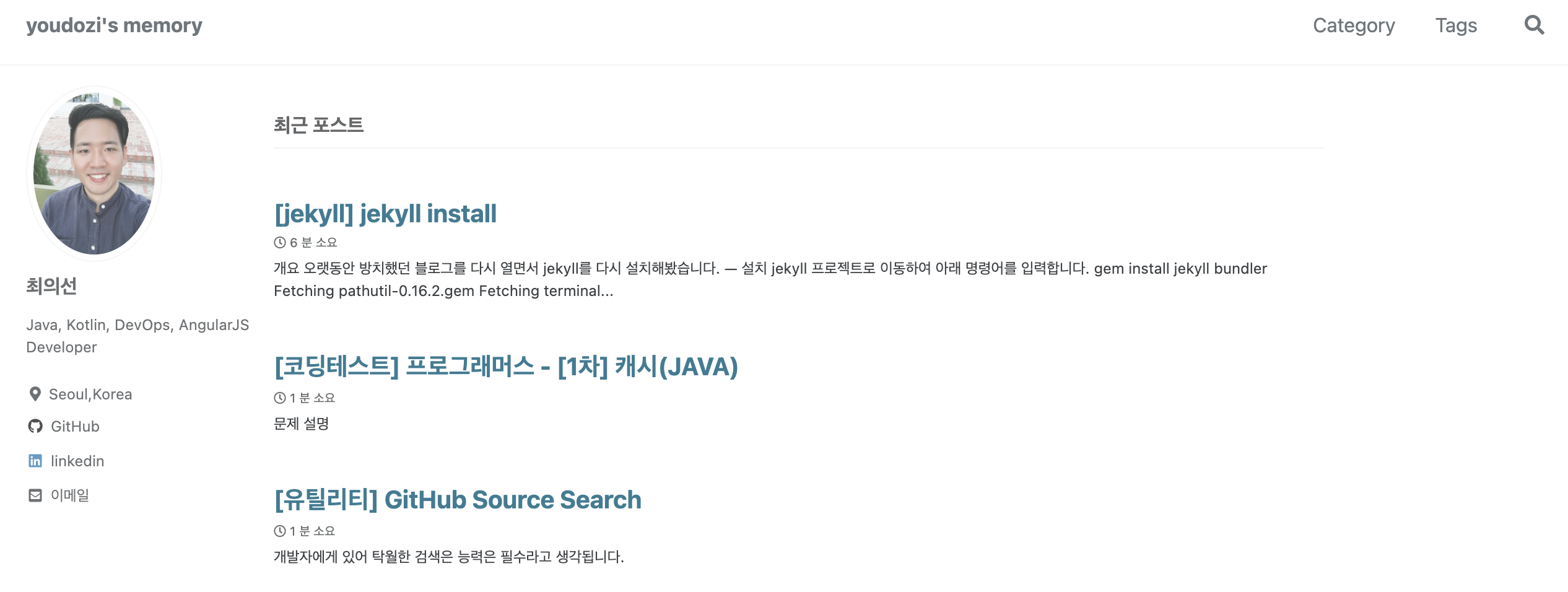
완료!!
검증 및 보강 — 2026-10-24
현재 이 저장소는 Astro로 전환되어 Node 24와 Python을 사용합니다. 이 글은 이전 Jekyll 환경 재현용입니다. 다른 Jekyll 저장소를 실행한다면 먼저 Gemfile과 프로젝트 Ruby 버전을 확인하고, bundle install 후 bundle exec jekyll serve를 사용하세요. 전역 gem install jekyll만으로 저장소 의존성이 재현되지는 않습니다. 이 글의 설치 로그와 버전은 과거 환경의 예시입니다.
댓글