Test HTTP Status Codes Locally with a Small Python Server
A status code alone does not establish that a response is usable. A client can receive HTML with 200, or a successful 204 with no body to decode. A local fixture lets you reproduce those cases without an external response service.
This example uses Python 3.11 or later and only the standard library. It binds to 127.0.0.1 and implements GET for a small, fixed route set. It is a development fixture, not an application server.
Processing flow
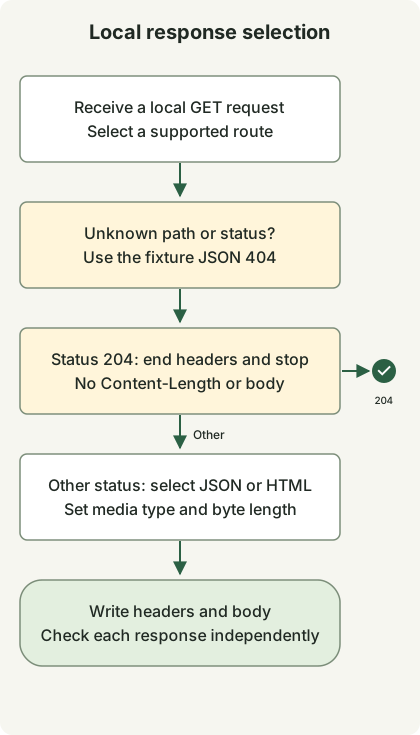
The handler selects the status and representation before writing headers. The 204 branch ends without a body or Content-Length; the other routes write the declared number of bytes.
Save the complete server as status_server.py
import argparse
import json
import re
from http.server import BaseHTTPRequestHandler, ThreadingHTTPServer
from urllib.parse import urlsplit

SUPPORTED = {200, 201, 204, 400, 404, 429, 500, 503}

class StatusHandler(BaseHTTPRequestHandler):
    def do_GET(self):
        path = urlsplit(self.path).path
        match = re.fullmatch(r"/status/([0-9]{3})", path)
        requested = int(match.group(1)) if match else None
        status = requested if requested in SUPPORTED else 404
        content_type = "application/json; charset=utf-8"
        body = json.dumps({"status": status}).encode("utf-8")
        if path == "/html/200":
            status = 200
            content_type = "text/html; charset=utf-8"
            body = b"<html><body>not JSON</body></html>"
        self.send_response(status)
        if status == 204:
            self.end_headers()
            return
        self.send_header("Content-Type", content_type)
        self.send_header("Content-Length", str(len(body)))
        self.end_headers()
        self.wfile.write(body)

    def log_message(self, format, *args):
        pass

def make_server(port=8089):
    return ThreadingHTTPServer(("127.0.0.1", port), StatusHandler)

if __name__ == "__main__":
    parser = argparse.ArgumentParser()
    parser.add_argument("--port", type=int, default=8089)
    args = parser.parse_args()
    if not 0 <= args.port <= 65535:
        parser.error("port must be from 0 through 65535")
    with make_server(args.port) as server:
        print(f"http://127.0.0.1:{server.server_port}", flush=True)
        try:
            server.serve_forever()
        except KeyboardInterrupt:
            pass
The Python HTTP server API supplies request handling and the threaded listener. Unsupported paths or status numbers return the fixture’s JSON 404. The route /html/200 deliberately returns HTML with a successful status.
Run the server in one terminal, then send requests in another:
python3 status_server.py --port 8089curl -i http://127.0.0.1:8089/status/500
curl -i http://127.0.0.1:8089/html/200
curl -i http://127.0.0.1:8089/status/204Use port 0 to let the OS choose a free port; the server prints the actual URL. Stop it with Ctrl+C. These curl commands intentionally omit --fail so you can inspect the error response too.
| Request | Status | Representation |
|---|---|---|
/status/200 |
200 | JSON containing status 200 |
/html/200 |
200 | HTML, not JSON |
/status/500 |
500 | JSON containing status 500 |
/status/204 |
204 | No body and no Content-Length |
RFC 9110 prohibits Content-Length on 204 responses. Treat body availability separately from a 2xx check. This fixture checks status, media type and framing; it does not model slow responses, TLS, authentication or retry timing. For client-side decoding and error signals, continue with the WebClient response tests.
Discussion