Jekyll on macOS: Verify Ruby, Bundler and a Two-Page Build
Before changing permissions, check which Ruby runs, which Bundler owns the dependency context, and whether a small site renders. This site’s live build uses Astro; the Jekyll example below is for diagnosing the retained Ruby archive.
The original installation used Ruby 3.2.2. That release line is now end of life, so the old version is a compatibility reproduction, not a recommendation for a new installation. Select a maintained Ruby compatible with your project’s gems before adopting it.
Select the interpreter before installing gems
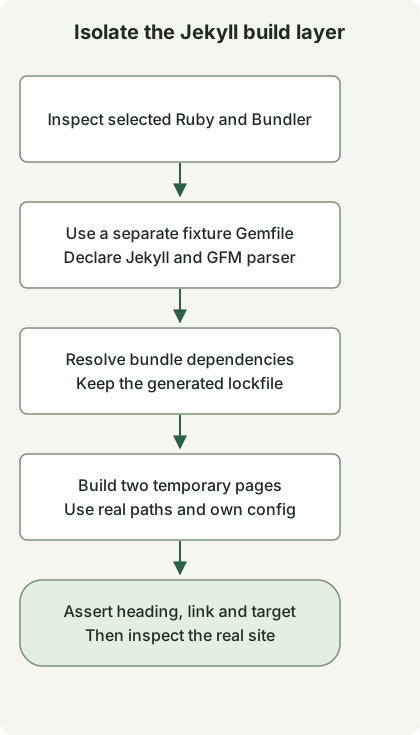
Jekyll’s macOS instructions advise using a separate Ruby environment rather than the system Ruby. This repository’s earlier setup used rbenv. Its version selection rules distinguish a per-project .ruby-version, RBENV_VERSION and the global default.
Run these commands in the project directory:
command -v ruby
ruby --version
rbenv version
rbenv which ruby
gem env home
bundle --version
If ruby is not selected through the expected manager, correct shell initialization before installing anything. Use rbenv init according to the installed rbenv version’s instructions; do not paste another user’s home path into your shell profile. A project-local selection is preferable to changing every Ruby project with rbenv global.
Test a bundle with two rendered pages
This compatibility fixture was executed with Ruby3.2.2, Bundler2.4.19, Jekyll3.9.3 and kramdown-parser-gfm1.1.0. These are recorded legacy versions, not a supported-version baseline. The Gemfile pins the two direct gems; the resulting Gemfile.lock records transitive versions for your platform.
Create a separate scratch directory and save these complete files there. Do not replace the repository’s existing Gemfile.
Gemfile
source 'https://rubygems.org'
gem 'jekyll', '= 3.9.3'
gem 'kramdown-parser-gfm', '= 1.1.0'
jekyll_probe.rb
require 'jekyll'
require 'tmpdir'
require 'fileutils'
require 'json'

Dir.mktmpdir('jekyll-probe-') do |root|
  root = File.realpath(root)
  source = File.join(root, 'source')
  destination = File.join(root, 'output')
  FileUtils.mkdir_p(File.join(source, '_layouts'))
  File.write(File.join(source, '_layouts', 'default.html'), '<!doctype html><html lang="en"><body>{{ content }}</body></html>')
  File.write(File.join(source, 'index.md'), "---\nlayout: default\ntitle: Probe\n---\n# Bundled build\n\n[Guide](/guide/)\n")
  File.write(File.join(source, 'guide.md'), "---\nlayout: default\npermalink: /guide/\n---\n# Local guide\n")
  config = Jekyll.configuration('config' => [], 'source' => source, 'destination' => destination, 'quiet' => true)
  Dir.chdir(source) { Jekyll::Site.new(config).process }
  home = File.read(File.join(destination, 'index.html'))
  guide = File.read(File.join(destination, 'guide', 'index.html'))
  raise 'Missing rendered heading' unless home.include?('<h1') && home.include?('Bundled build')
  raise 'Missing guide link' unless home.include?('href="/guide/"')
  raise 'Missing guide output' unless guide.include?('Local guide')
  puts JSON.generate('ruby' => RUBY_VERSION, 'jekyll' => Jekyll::VERSION, 'pages' => 2, 'result' => 'passed')
end
With the selected Ruby and Bundler available, run from that directory:
bundle install
bundle exec ruby jekyll_probe.rb
If the exact gems are already installed, bundle lock --local can resolve from that local inventory before the same execution command. It cannot obtain a missing gem. Keep the lockfile when reproducing a failure, and review changes before updating it. Bundler’s application guide explains the Gemfile/lockfile role.
The observed result was:
{"ruby":"3.2.2","jekyll":"3.9.3","pages":2,"result":"passed"}The probe builds in a temporary directory, uses its real path to avoid a macOS /var symlink mismatch, disables default configuration-file discovery and switches into its own source while rendering. It checks a heading, a link and the target page. Temporary files are removed afterwards; the full archive, its theme, plugins, CSS and deployment are outside this check.
Distinguish availability from bundle membership
During this reproduction, Jekyll could load but Markdown conversion failed because the bundle did not declare kramdown-parser-gfm. Installing a gem somewhere on the machine and making it available inside bundle exec are separate conditions. Adding the parser to this fixture’s Gemfile allowed conversion.
A successful two-page probe narrows the next investigation to the real site’s configuration, theme, plugins and inputs. A failure while loading a native extension belongs to a different layer: use the Ruby and C++ diagnostic probe. For this site’s active publishing process, use the Astro candidate-review workflow.
Discussion