PHP2Shell Response: Verify the Patched PHP Build and Web Workers
On this page
PHP2Shell remediation does not end with a CMS or plugin update. Obtain a PHP build fixing CVE-2026-109618 and CVE-2026-109619, then verify that every worker serving web requests uses it. A terminal’s php -v reports only the CLI selected in that terminal.
What does PHP2Shell affect?
The two CVEs concern request state and memory lifetime in the PHP engine. The first involves invalid state used during cleanup after out-of-memory handling interrupts initialization. The second involves internal state surviving after request memory is released and being used by a later request on the same worker. Under the affected conditions, unauthenticated remote code execution is possible.
The PHP team’s advisory includes PHP-FPM, php-cgi, FrankenPHP and LiteSpeed as well as mod_php among web-serving deployments to investigate. A particular SAPI is not a reason to exclude a service. Conversely, a vulnerable version string alone does not demonstrate a reachable exploit path in that service.
Which version should you compare?
These are the first upstream source releases fixing the original two CVEs, checked on October 30, 2026. Before installation, check the same supplier’s current supported release and follow-up advisories.
| PHP branch | First source release fixing both CVEs |
|---|---|
| 8.2 | 8.2.35 |
| 8.3 | 8.3.36 |
| 8.4 | 8.4.27 |
| 8.5 | 8.5.12 |
For distribution packages, compare the full package revision with its vendor advisory rather than the short PHP version. For example, Ubuntu USN-8948-1 identifies 8.3.6-0ubuntu0.24.04.13 as the fixed php8.3-fpm package for Ubuntu 24.04. Comparing that number with upstream 8.3.36 misclassifies a backport. The notice does not authenticate arbitrary custom builds displaying the same version string.
PHP 8.1 and older are no longer supported by the PHP project. Verify vendor support and backport evidence, or migrate to a supported branch. A published source patch and proof that a server runs that patch are different things.
Collect CLI evidence without mistaking it for web evidence
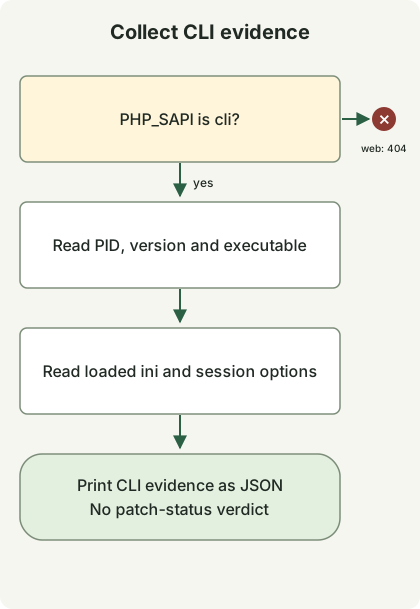
The diagram follows the collector below. Under a web SAPI it exits without printing information. Under the CLI it records executable, version and configuration without deciding patch status. Service identification, patching and restart are separate operational steps that this code does not perform.
With PHP 8.2 or later, save the file in a new directory outside the document root. It reads only the current process using PHP constants and ini_get; it sends no requests, changes no settings and starts no sessions. There is no need to publish a phpinfo() page.
runtime-evidence.php
<?php
if (PHP_SAPI !== 'cli') {
    http_response_code(404);
    exit;
}

$evidence = [
    'scope' => 'this-cli-process-only',
    'pid' => getmypid(),
    'version' => PHP_VERSION,
    'sapi' => PHP_SAPI,
    'binary' => PHP_BINARY,
    'loadedIni' => php_ini_loaded_file() ?: null,
    'uploadProgress' => ini_get('session.upload_progress.enabled'),
    'serializeHandler' => ini_get('session.serialize_handler'),
];
echo json_encode($evidence, JSON_PRETTY_PRINT | JSON_THROW_ON_ERROR), PHP_EOL;
php runtime-evidence.php
php -n -d session.upload_progress.enabled=0 runtime-evidence.phpThe first command reads the selected CLI’s configuration. The second skips ini files and disables upload progress only for that CLI invocation. It neither changes web-server settings nor checks a web worker’s effective configuration.
The local check ran in an isolated PHP CLI container and confirmed JSON output with sapi equal to cli. The second command returned null for loadedIni and the string "0" for uploadProgress. Paths, PID, version and defaults vary by environment. These results do not establish a production service’s patch status or reproduce exploitation.
Verify installation and running workers separately
- Follow web-server upstream, FastCGI or module configuration to identify the actual PHP executable, pools, containers and replicas. Do not assume the host CLI and web runtime share an installation path.
- Compare that runtime’s supplier and full package revision or image digest with the advisory. For a custom build, establish the connection between the fix commit and deployed artifact.
- Deploy a compatible fixed build and replace the affected pool or service workers, or its containers. Check the change scope first if other services share the runtime.
- Verify the connection between new processes and the fixed build across every target. Check normal pages, login/session behavior, uploads and error rates. Do not count partial rollout or missing running-process evidence as completion.
Separating “fixed artifact identified” from “running adoption verified” in internal asset records helps locate missed workers. A crash alone does not prove compromise, and missing error logs do not exclude it. If compromise is suspected, preserve evidence and investigate separately from patching.
Separate the session follow-up and Windows rebuild
The October 23 PHP follow-up tracks CVE-2026-115560 separately. It concerns the combination of session.serialize_handler configured as php_binary or php_serialize, application code switching it to php before calling session_start(), and upload progress remaining enabled. The notice suggests session.upload_progress.enabled=0 until the next regular fix. That setting is not evidence that both original CVEs are fully resolved. Check the effective web-SAPI configuration and feature impact.
The October 26 Windows notice announces packages 8.5.12-1, 8.4.27-1, 8.3.36-1 and 8.2.35-1 incorporating the Brotli fix for CVE-2026-111497. These rebuild dependencies without changing the PHP source version, so PHP_VERSION alone cannot distinguish them. Windows deployments using cURL automatic response decompression need to check that package fix too. Continue with the Node2Shell response guide for the same Brotli CVE in Node.js.
Discussion