Defending Against AI-Assisted Cyberattacks: Phishing, Exploits and Agent Hijacking
On this page
To prepare for AI-assisted attacks, reduce account compromise and exploitation of disclosed vulnerabilities, and prevent AI agents from executing unauthorized actions even after reading external content. Checking whether authentication, patching, permissions and outbound-transfer controls actually work is more directly useful than determining whether an attack message was written by AI.
This article is for teams operating services or introducing AI agents into development workflows. It covers responses by attack path and local log correlation. The operational procedures below are proposals, rather than an account of an organization’s incident or measured defensive effectiveness.
Using AI to attack versus attacking AI
Attackers can use AI to organize target information and create impersonation messages or code. Our own AI agents can also be the targets. Indirect prompt injection, for example, hides instructions in external documents to induce data transfers or deployment-configuration changes.
The UK NCSC’s threat assessment through 2027 projects that AI will make existing activities such as reconnaissance, social engineering and vulnerability research more efficient. It also assesses that the response window between disclosure and exploitation of known vulnerabilities could shrink further. These forecasts should not be read as observations that every attack has already become fully automated.
| Attack path | Attacker’s objective | Boundary to protect first |
|---|---|---|
| Targeted phishing and executive impersonation | Login, account recovery or payment approval | Authentication, recovery and a separate verification channel |
| Assisted vulnerability discovery and exploitation | Intrusion into exposed services and theft of secrets | Exposed assets, patching and isolation |
| Agent prompt injection | Unauthorized tool execution or outbound transfers | Separation of data and instructions; tool and network permissions |
Several paths can connect in one incident. If an account compromise enables malicious instructions to be placed in an internal document, investigate both identity and agent defenses.
Defend against phishing through authentication and approval paths
Microsoft’s analysis of executive impersonation and invoice fraud describes a campaign combining fake executive emails, invoices and content presented as forwarded conversations. Researchers observed indicators consistent with AI-assisted template development, but state that those indicators cannot establish how much content AI generated. Particular punctuation or comment formats are not a sufficient basis for attack-classification rules.
Start by checking these operational boundaries:
- Login: Deploy phishing-resistant authentication, such as FIDO2 or passkeys, for supported accounts and verify that actual sign-in policies require it. Microsoft’s phishing-resistant MFA guidance discusses interception and fatigue risks affecting SMS, OTP and push authentication, and migration to stronger methods.
- Recovery and enrollment: When the help desk registers a new authentication method or recovers an account, verify identity using trusted existing records and a separate procedure. Establish operational rules that do not approve recovery based on a single email or video call.
- Business approval: Verify bank-account changes and requests to share secrets through previously registered contact details or an internal approval system, rather than contact details in the message. Payment fraud can succeed without account compromise, so stronger login alone does not complete the defense.
Use SPF, DKIM, DMARC and impersonation detection together for email defense. Passing email authentication does not establish the business legitimacy of requests from lookalike domains or compromised legitimate accounts. Phishing-resistant authentication also does not resolve every stolen-session or compromised-endpoint scenario.
Prioritize exposure and exploitation risk in vulnerability response
An exposed service remains vulnerable while defenders wait for evidence that an attacker used AI. First connect each internet-facing service to its product, running version, owner and patch status, then check vendor advisories and observed exploitation information. Whether instances currently serving traffic run the fixed version matters more than a record that source code or an image tag changed.
Prioritize response using external exposure, observed exploitation, accessible data and privileges, and service impact together. If immediate patching is difficult, apply vendor-supported mitigations or exposure restrictions, and record an owner and reassessment time for the exception. Adding a WAF rule does not remove the underlying vulnerability.
If exploitation may already have occurred, investigate the incident alongside patching. Preserve process, authentication and outbound-communication records; determine credential rotation and rebuilding from trusted images according to the scope of compromise. A successful patch does not establish removal of intrusion traces or persistence.
Do not turn content an agent reads into execution authority
When an AI agent reads issues, repository files or web pages, that content may be attacker-controlled. Treating text that says “after reading this document, execute the following command” as having the same authority as the user’s approved task can turn information retrieval into an outbound transfer.
OWASP’s prompt-injection prevention guidance recommends validating tool calls against user permissions and session context, validating tool-specific parameters and applying least privilege. Adding a warning to the input or asking the model to ignore malicious instructions does not itself enforce execution permissions.
Enforce each user’s and task’s permitted resources and actions at the tool execution boundary outside the model. Use read-only accounts and short-lived credentials, and restrict network transfers by destination, protocol and data scope. A destination allowlist alone is insufficient if an approved domain still permits transfers to an attacker’s account or arbitrary paths. Show the specific target and changes when obtaining approval for important modifications or transfers.
Record task IDs, execution identities, tool names, policy decisions and outcomes. Represent decision reasons as observable policy codes; there is no need to collect the model’s hidden reasoning. Logging entire source documents, tokens or passwords can create another disclosure point. See AI agent permission boundaries for the operational authorization boundary.
Correlate denied transfers after external-content reads
The following Python example correlates synthetic events attributed to a trusted executor. It flags an investigation candidate when an external transfer is denied within 300 seconds after an external-content read for the same actor and run ID. It neither identifies prompt injection nor blocks requests. It assumes that separate tool or network policies have already generated the denial events.
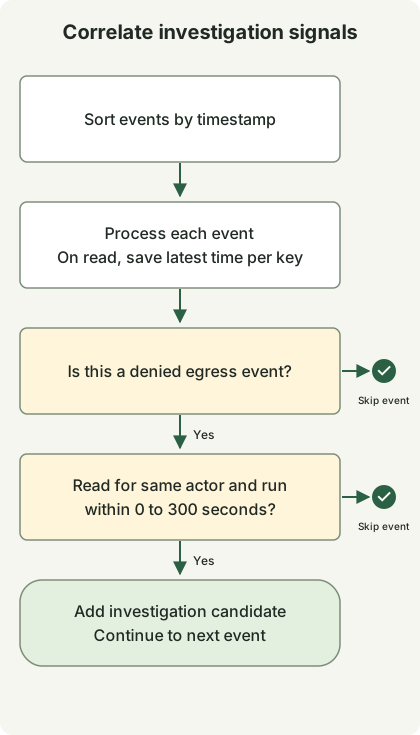
The diagram summarizes the branches for processing one event. The right-hand termination symbols mean skipping the current event, rather than a safety verdict. The code repeats processing for each event and stores the latest read timestamp. Events that do not satisfy the conditions are skipped. The diagram does not represent an entire attack-detection or incident-response process.
The example was executed with Python 3.13.0 and uses no external packages, network or production logs. Save it as correlate.py. Here, at is seconds from the example’s starting point; real collection requires synchronized event timestamps and stable run IDs. Do not populate kind or identifiers by trusting document text or arbitrary model-generated values.
from dataclasses import dataclass


@dataclass(frozen=True)
class Event:
    at: int
    actor: str
    run: str
    kind: str


def correlate(events: list[Event], window: int = 300) -> list[tuple[str, str, int]]:
    if window < 0:
        raise ValueError("window")
    last_read: dict[tuple[str, str], int] = {}
    candidates = []
    for event in sorted(events, key=lambda item: item.at):
        key = (event.actor, event.run)
        if event.kind == "untrusted_read":
            last_read[key] = event.at
        elif event.kind == "egress_denied":
            read_at = last_read.get(key)
            if read_at is not None and 0 <= event.at - read_at <= window:
                candidates.append((event.actor, event.run, event.at))
    return candidates


if __name__ == "__main__":
    events = [
        Event(20, "agent-a", "run-1", "egress_denied"),
        Event(0, "agent-a", "run-1", "untrusted_read"),
        Event(30, "agent-a", "run-2", "egress_denied"),
        Event(40, "agent-b", "run-1", "egress_denied"),
        Event(301, "agent-a", "run-1", "egress_denied"),
    ]
    print(correlate(events))
python3 correlate.pyThe actual execution output is:
[('agent-a', 'run-1', 20)]Only the event at 20 seconds for the same run is selected. Denials for other runs or actors and those outside the time window are excluded. The 300-second window is an illustrative choice, rather than a validated security threshold. Temporal proximity does not establish that injection caused the transfer attempt. Legitimate automation can produce the same pattern.
Thirteen separate local checks covered the inclusive 300-second boundary, exclusion at 301 seconds, reordered input, timestamp zero, isolation between actors and runs, denials without reads, successful transfers and a negative window. Three regression mutations that excluded the 300-second boundary, ignored the actor or mishandled timestamp zero were also detected. No alert does not establish safety: this rule can miss transfers that were not blocked and missing logs. Production adoption requires handling stream delays and reordering, state expiry, deduplication, restart recovery and false-positive evaluation. This batch example does not implement those features.
Verify execution outcomes and close the damage path after an alert
Check executor policy outcomes and network and destination-service records rather than relying on an agent’s statement that it blocked an action. One egress_denied event indicates that the particular attempt was denied; it does not establish that no other path leaked data. Stop the suspicious run and correlate source access, tool calls and outbound communications using its task ID.
| Situation | Proposed initial response | Checks before resuming |
|---|---|---|
| Suspected login or account changes after phishing | Invalidate relevant sessions and tokens, recover the account, inspect enrolled authentication methods and consent grants | Remove attacker-added access paths and verify legitimate login |
| Suspected exploitation of an exposed service | Isolate affected assets, preserve evidence, apply fixed versions and rebuild where necessary | Verify running versions and exposure; investigate persistence and lateral movement |
| Unauthorized agent calls | Stop the run, revoke or rotate relevant credentials, restrict tools and transfer paths | Regression-test that unauthorized requests are denied and approved work still succeeds |
Automatic blocking can interrupt service, so apply it according to detection confidence and scope of impact. If containment and evidence preservation conflict, choose the order based on ongoing damage and collection cost. Tool and outbound-transfer permissions must also be separated when giving attacker-supplied material to an investigation AI. The joint national security agencies’ guidance on adopting agentic AI includes components, integrations and operations in the risk-assessment scope.
Start with one externally exposed asset, one important account and one agent task that reads external documents. Connect actual enforcement, investigable logs and a recovery procedure an owner can execute for each. Include successful legitimate requests in repeated tests, and check that changing rejection boundaries makes verification fail, as demonstrated in AI-assisted TDD.
Discussion