How to use the Ponytail skill — small fixes and regression tests with Codex
On this page
Ponytail is a skill that helps an AI coding agent deliver the requested behavior by reusing existing code. If a stock label displays 1 items when there is one item, first check whether the project already has a function for singular and plural labels. Reuse it to fix the display, then test that quantities of 0 and 2 still behave as before.
Getting started in Codex and Claude Code
If the standalone Ponytail skill is already installed in Codex, enter $ponytail-help in the chat to see the skill names and modes. Follow $ponytail full with the behavior to change, the conditions to preserve, and the command to verify the change. The exercise below uses the standalone skill installed at ~/.agents/skills/ponytail/SKILL.md. In this setup the mode sets a working preference for the current conversation. Use $ponytail off to turn it off. Codex skill documentation
The Ponytail project also distributes a plugin. For Codex CLI, run the two commands below in your shell. Then open Codex and inspect what the two hooks run under /hooks. To use the hooks, trust them after reviewing them and start a new conversation. The hook environment needs node on its PATH. Ponytail installation guide
codex plugin marketplace add DietrichGebert/ponytail
codex plugin add ponytail@ponytail
In Claude Code, enter the two commands below one line at a time, then select a mode with /ponytail full. The plugin includes the /ponytail-review command. In the Codex plugin the review skill appears with a plugin prefix, as in $ponytail:ponytail-review. Installation and hook behavior for both plugins follow the public documentation. Claude Code installation guide · Ponytail commands
/plugin marketplace add DietrichGebert/ponytail
/plugin install ponytail@ponytail
When should you use Lite, Full, or Ultra?
In the standalone Codex skill, entering $ponytail by itself uses Full, the default mode.
| Invocation | How it works | Example |
|---|---|---|
$ponytail lite |
Completes the request and briefly mentions a smaller approach when it would materially help. | Change UI copy that the team has already agreed on. |
$ponytail full |
Checks callers and existing tests, then delivers the requested behavior with the smallest complete change. Reports verified results and remaining risks. | Fix a singular label and check the existing inputs. |
$ponytail ultra |
Flags needless expansions in scope while carrying out the requested work. | Fix an error on one screen and assess separately whether a shared UI overhaul is warranted. |
To keep the change small, state what to change, what to preserve, and how to verify it. Include behavior that callers depend on, such as authorization checks, input validation, and data protection. The skill guides how the agent works. The agent’s permissions determine where it can write files and which commands it can execute.
Exercise — display 1 item when one item is in stock
The exercise ran in an empty practice repository with Node.js 22.17.0 and Codex CLI 0.169.0. To recreate the starting state, use the return line below in stockLabel. The first test in stock.test.mjs was already present at the start. The second was added for this change.
return `${count} items`;Example prompt $ponytail full Fix stockLabel(1) returning 1 items. Keep items for 0 and 2. Reuse the existing formatCount function, add a regression test for stockLabel, and run node --test. Do not modify anything outside this practice repository or make a commit.
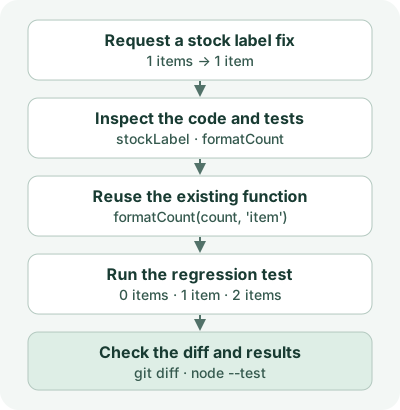
The only change to stock.mjs was the return expression in stockLabel. It calls formatCount, which already handles singular and plural labels.
export function formatCount(count, noun) {
  return `${count} ${count === 1 ? noun : noun + 's'}`;
}

export function stockLabel(count) {
  return formatCount(count, 'item');
}
In stock.test.mjs, check the labels for quantities of 0, 1, and 2. Put the two files in the same directory and run node --test.
import assert from 'node:assert/strict';
import test from 'node:test';
import { formatCount, stockLabel } from './stock.mjs';

test('formatCount handles singular and plural', () => {
  assert.equal(formatCount(1, 'item'), '1 item');
  assert.equal(formatCount(2, 'item'), '2 items');
});

test('stockLabel handles zero, one, and two items', () => {
  assert.equal(stockLabel(0), '0 items');
  assert.equal(stockLabel(1), '1 item');
  assert.equal(stockLabel(2), '2 items');
});
With the original implementation, the added test failed for quantity 1. It expected 1 item and received 1 items. After the fix, the run produced the following output.
ok 1 - formatCount handles singular and plural
ok 2 - stockLabel handles zero, one, and two items
# tests 2
# pass 2
# fail 0
The exercise covers two tests and changes to two files. After the agent reports completion, compare the actual git diff and the test results to verify that it reused the existing function and stayed within scope.
Set the review scope after the change
If the companion standalone skills are installed, use the commands below. Naming the part of the code to review makes the findings easier to verify. Ponytail commands
| Invocation | When to use it |
|---|---|
$ponytail-review |
Reviews the current diff and related code. Use it before opening a PR to check callers or missing regression tests. |
$ponytail-audit |
Surveys the whole repository in read-only mode and ranks the issues it finds. |
$ponytail-debt |
Collects existing shortcut: comments and older ponytail: comments for inspection. |
$ponytail-gain |
Shows the project’s published benchmark report. Measuring time or cost savings in your own repository requires a separate comparison. |
$ponytail-help |
Lists the modes and invocations for the installed skills. |
Discussion