Commerce Admin Design for Order Queues, Payments, and Fulfillment
On this page
A commerce admin screen should help operators find the orders that need attention and see the evidence they need to act. Start with queues for payment checks, fulfillment, and refund follow-up. In the order detail, show the payment result alongside the stock reserved for that order. When payment clears after the reservation has been released, the operator should be able to keep shipment on hold and track the refund request.
Assume one merchant selling physical goods in Korean won (KRW) and shipping from one warehouse. This guide brings the last-unit example from the system design article, and the order-line, reservation, and payment-attempt model from the database article, into the admin screen. It follows an operator looking up an existing transaction with the payment provider. Commerce system design · Commerce database design
Give each menu an operational starting point
Orders is the starting point for day-to-day operations. Payments and Refunds and Fulfillment take staff directly to their pending work. Wherever they start, the same order number should lead to the same details and history so staff can hand off work across shifts and teams.
| Menu | Work that starts here | What the operator needs to see |
|---|---|---|
| Orders | Open orders with unknown payment results, orders awaiting fulfillment, or orders with pending refunds. | Order number, items and amounts at purchase, the four status fields |
| Catalog | Edit whether a SKU is available for sale, its options, or its current price. | Current terms per SKU, before and after values |
| Inventory | Find orders with reserved stock or adjust discrepancies from a physical count. | On-hand, reserved, and allocated stock per SKU, linked orders, adjustment history |
| Payments and Refunds | Reconcile existing provider transactions and follow up on refund requests. | Payment attempts, provider transaction ID, original transaction amount, lookup and refund history |
| Fulfillment | Pick and ship the items allocated to orders. | SKU, quantity, eligibility to ship, dispatch records |
| Roles and Permissions | Grant staff permission to view or perform work and review changes. | Permissions by task, their scope, grant and revocation history |
A catalog price change applies to future sales. The order detail reads the amount saved on the order line. For example, order O-42 for a black keyboard totals KRW 43,000 after applying a KRW 2,000 discount to the KRW 42,000 unit price and adding KRW 3,000 in shipping. The detail and refund review screens continue to show the purchase-time amount when the catalog price changes.
Choose work in the queue and check the evidence in the detail
Payment checks collects orders with unknown payment results. Awaiting fulfillment collects orders whose stock has been allocated and whose shipments are waiting for processing. Refund follow-up collects orders with recorded refund requests awaiting a final result. Choose a sort order for each queue. For example, payment checks can show the oldest detected issues first, while fulfillment can sort by the warehouse cutoff.
Show the order number, order time, product, amount, and current statuses in the list. Allow searches by order number, product name, or SKU alongside a payment-status filter. Show the unfiltered total beside each task and the current result count above the list. In production, add date and assignment filters as needed and preserve filters, search terms, and scroll position when the detail closes. If an update removes the original row from the list, return focus to the selected task so the operator can move to the next order.
| Status | What to display | Why it matters |
|---|---|---|
| Order | Awaiting payment, confirmed, canceled | Shows where the order stands. Payment for a canceled order may still arrive late. |
| Payment | Payment unknown, paid, refund requested, refunded | Shows whether to recheck the existing transaction or wait for the refund result. |
| Inventory | Reserved, reservation released, allocated, stock shipped | Shows the quantity secured for the order and its current state. |
| Fulfillment | Shipment on hold, awaiting fulfillment, shipped | Shows whether the warehouse can act now or has already shipped the order. |
In the order detail, put the purchase-time amount, SKU and quantity, linked reservation ID, and provider transaction ID directly below the statuses. When payment is unknown, the amount currently available for sale cannot tell you whether this order has secured any stock. Show when each change happened, who made it, where it came from, and the relevant identifiers in the history. Keep status labels readable on narrow screens and use color for emphasis.
Check the existing transaction when payment is unknown
The response to the payment request for O-42 was lost. The result remained unknown long enough for a staff member to approve an exception, release reservation R-42, and cancel the order. The payments operator opens the order and checks the existing transaction PG-DEMO-42. When payment is confirmed, record a refund request. Keep the order canceled, leave shipment on hold, and leave the reservation released. Record the refund as complete once the provider confirms it.
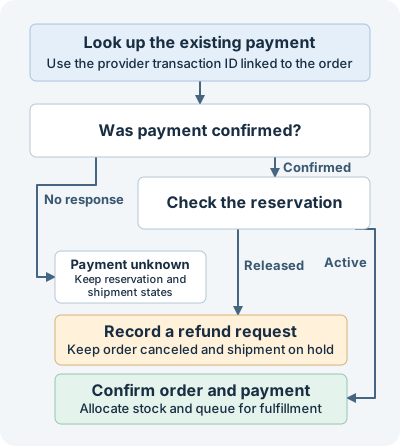
The diagram shows the branches for three fictional orders. The lookup for O-43 gets no response, so payment stays unknown, the reservation stays active, and shipment stays on hold. For O-44, payment is confirmed and the reservation is active, so the order is confirmed, payment is marked paid, stock is allocated, and the order moves to awaiting fulfillment. The diagram covers missing responses and confirmed payments. In production, a confirmed unpaid closure can lead to releasing the reservation and canceling the order. If transaction details disagree, record a reconciliation exception before changing any state.
A JavaScript example for the state transitions
This example applies the lookup results to three fictional orders with unknown payment results and shipments on hold. Paste it into a browser developer console to run it without installing anything. The function only updates the in-memory order objects.
function applyDemoPaymentResult(order, result) {
  if (order.payment !== 'UNKNOWN' || result !== 'PAID') return 'NO_CHANGE';

  if (order.stock === 'RELEASED') {
    order.payment = 'REFUND_PENDING';
    return 'REFUND_REQUESTED';
  }

  if (order.stock === 'HELD') {
    order.order = 'CONFIRMED';
    order.payment = 'PAID';
    order.stock = 'ALLOCATED';
    order.shipping = 'READY';
    return 'READY_TO_SHIP';
  }

  return 'NO_CHANGE';
}

const examples = [
  ['O-42', 'CANCELLED', 'RELEASED', 'PAID'],
  ['O-43', 'PENDING_PAYMENT', 'HELD', 'UNAVAILABLE'],
  ['O-44', 'PENDING_PAYMENT', 'HELD', 'PAID'],
];

for (const [id, state, stock, result] of examples) {
  const order = { order: state, payment: 'UNKNOWN', stock, shipping: 'BLOCKED' };
  console.log(id, applyDemoPaymentResult(order, result), ...Object.values(order));
}
The expected console output shows the order ID, result, and the order, payment, inventory, and fulfillment states in that order.
O-42 REFUND_REQUESTED CANCELLED REFUND_PENDING RELEASED BLOCKED
O-43 NO_CHANGE PENDING_PAYMENT UNKNOWN HELD BLOCKED
O-44 READY_TO_SHIP CONFIRMED PAID ALLOCATED READY
The code block ran on Node.js 24.13.0 and produced all three expected lines.
Enforce action permissions and state checks on the server
Give payments staff access to existing transaction lookups, warehouse staff access to shipment records, and designated approvers authority over exceptional reservation releases or refund approvals. Grant catalog price changes separately. Return only the fields and available actions relevant to the current user in the order detail. On each action request, the API should check authentication, the action permission, access to the target order, and its current state. The payment lookup API finds the existing transaction linked to the order on the server. Match the provider account, transaction ID, amount, and currency. Read the latest order and linked reservation when applying the result, and prevent duplicate shipment or refund requests if a retry races with a webhook. When the warehouse requests shipment, the server also rechecks that the order is confirmed, payment is confirmed, and stock is allocated.
For actions such as looking up an existing transaction, show the transaction and the scope of the action near the button. The lookup does not create a new charge. When it confirms payment, the reservation state determines whether to request a refund or move the order to awaiting fulfillment. Actions that directly affect money or stock, such as issuing a manual refund or releasing a reservation by exception, need separate confirmation and permission. For example, a manual refund confirmation shows order O-42, original transaction PG-DEMO-42, requested refund of KRW 43,000, and the reason. Label the accepted request “Refund requested” and save the approver, operator, request time, previous and new states, linked transaction, and result in the server-side audit history. If the response is lost, look up the status of the same request first.
Use different messages for empty queues and unknown results
| Situation | Message and next action |
|---|---|
| The queue has no orders | “There are no orders for this task.” Let the operator open another queue. |
| Nothing matches the search or filters | “No orders match your search or filters.” Let the operator clear those conditions while staying in the current queue. |
| The order list failed to load | “Couldn’t load orders.” Keep the search conditions and offer to reload. If older results remain visible, show when they were retrieved. |
| The order is open but the provider result is unknown | “The lookup returned no response. Payment is still unknown, and shipment remains on hold.” Let the operator look up the same transaction again. |
| The user lacks permission for the action | “Payments staff can look up existing transactions.” Keep the statuses and history visible within the current role’s access. |
Reflect the example results in the work queues
Imagine opening an order in Payment checks and choosing Check existing payment. With no response, O-43 stays in Payment checks. The lookup history records that no response came back and the reservation stayed active. After recording the refund request for O-42, you can find it in Refund follow-up. After allocating stock for O-44, you can find it in Awaiting fulfillment. A fulfillment operator sees the order statuses and history, with a message explaining that payments staff can run the lookup.
The example uses prepared orders and payment responses. A production implementation handles sign-in, customer data, actual provider queries and refunds, and warehouse integration separately.
Discussion