在 Spring Boot 4.2 中迁移 RestTemplate 和 TestRestTemplate
调用外部 API 时使用 RestClient,向应用发送请求并断言响应的测试则使用 RestTestClient。 Spring Boot 4.2 已弃用 RestTemplate 的自动配置和构建器,以及对 TestRestTemplate 的支持。迁移时,成功用例和错误断言都要保留。如果原测试检查 HTTP 404,新测试也应断言该状态。 Spring Boot 4.2 发行说明
哪些 API 可以替代原有 API?
| 原有代码 | 替代方案 | 要检查的行为 |
|---|---|---|
RestTemplateBuilder 与 getForObject() |
RestClient.Builder 与 get().uri().retrieve().body() |
基础 URL、请求头,以及 4xx 和 5xx 响应的处理方式 |
RestTemplateCustomizer |
RestClientCustomizer |
拦截器、超时和请求工厂 |
@AutoConfigureTestRestTemplate 与 TestRestTemplate |
@AutoConfigureRestTestClient 与 RestTestClient |
实际服务器的启动方式、状态码和响应体 |
默认情况下,RestClient.retrieve() 和采用默认配置的 RestTemplate 遇到 4xx 和 5xx 响应都会抛出异常。TestRestTemplate 会返回响应,让测试检查状态码。使用 RestTestClient 时,在 exchange() 后调用 expectStatus() 即可保留断言。原客户端如果使用自定义错误处理器,可用 defaultStatusHandler() 或各请求的 onStatus() 表达相同的状态规则。 Spring Framework REST 客户端参考 · TestRestTemplate API
用商品查询 API 测试两处 HTTP 边界
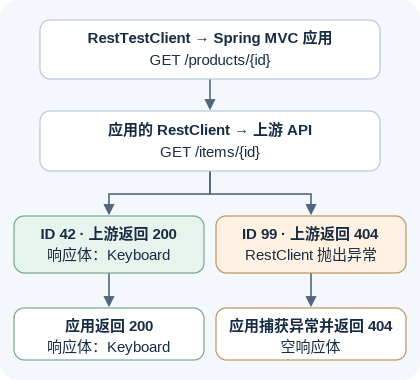
商品 ID 为 42 时,上游 API 返回名称 Keyboard。其他 ID 均返回 404。图中展示了两项经由应用发送请求的集成测试。测试启动本地 HTTP 服务器来代替上游 API。
pom.xml
示例使用 Spring Boot 4.2.0 和 JDK 21。MVC 测试 starter 包含 RestTestClient 的自动配置模块。
<project xmlns="http://maven.apache.org/POM/4.0.0">
    <modelVersion>4.0.0</modelVersion>
    <parent>
        <groupId>org.springframework.boot</groupId>
        <artifactId>spring-boot-starter-parent</artifactId>
        <version>4.2.0</version>
    </parent>
    <groupId>example</groupId>
    <artifactId>restclient-migration</artifactId>
    <version>1.0.0</version>
    <properties>
        <java.version>21</java.version>
    </properties>
    <dependencies>
        <dependency>
            <groupId>org.springframework.boot</groupId>
            <artifactId>spring-boot-starter-webmvc</artifactId>
        </dependency>
        <dependency>
            <groupId>org.springframework.boot</groupId>
            <artifactId>spring-boot-starter-restclient</artifactId>
        </dependency>
        <dependency>
            <groupId>org.springframework.boot</groupId>
            <artifactId>spring-boot-starter-webmvc-test</artifactId>
            <scope>test</scope>
        </dependency>
    </dependencies>
</project>
src/main/java/example/CatalogApplication.java
如果原有调用是 restTemplate.getForObject("/items/{id}", String.class, id),则在新调用中保留 URI 模板和响应类型。注入由 Boot 配置的构建器,并设置上游基础 URL。此示例中,上游因商品不存在返回 404 时,控制器会让应用也返回 404。
package example;

import org.springframework.beans.factory.annotation.Value;
import org.springframework.boot.SpringApplication;
import org.springframework.boot.autoconfigure.SpringBootApplication;
import org.springframework.http.ResponseEntity;
import org.springframework.stereotype.Service;
import org.springframework.web.bind.annotation.GetMapping;
import org.springframework.web.bind.annotation.PathVariable;
import org.springframework.web.bind.annotation.RestController;
import org.springframework.web.client.HttpClientErrorException;
import org.springframework.web.client.RestClient;

@SpringBootApplication
public class CatalogApplication {
    public static void main(String[] args) {
        SpringApplication.run(CatalogApplication.class, args);
    }
}

@Service
class CatalogClient {
    private final RestClient http;

    CatalogClient(RestClient.Builder builder, @Value("${catalog.base-url}") String baseUrl) {
        this.http = builder.baseUrl(baseUrl).build();
    }

    String findName(long id) {
        return http.get()
            .uri("/items/{id}", id)
            .retrieve()
            .body(String.class);
    }
}

@RestController
class ProductController {
    private final CatalogClient catalog;

    ProductController(CatalogClient catalog) {
        this.catalog = catalog;
    }

    @GetMapping("/products/{id}")
    ResponseEntity<String> product(@PathVariable("id") long id) {
        try {
            return ResponseEntity.ok(catalog.findName(id));
        } catch (HttpClientErrorException.NotFound ex) {
            return ResponseEntity.notFound().build();
        }
    }
}
src/test/java/example/CatalogApplicationTests.java
保留 RANDOM_PORT,使 HTTP 请求实际发给运行中的嵌入式服务器。Boot 注入的 RestTestClient 以该服务器地址解析相对路径。如果之前的测试通过 getForEntity("/products/99", String.class).getStatusCode() 检查 404,则用 exchange().expectStatus().isNotFound() 断言相同状态。 Spring Boot 文档:测试运行中的服务器
package example;

import java.io.IOException;
import java.io.UncheckedIOException;
import java.net.InetSocketAddress;
import java.nio.charset.StandardCharsets;

import com.sun.net.httpserver.HttpServer;
import org.junit.jupiter.api.AfterAll;
import org.junit.jupiter.api.Test;
import org.springframework.beans.factory.annotation.Autowired;
import org.springframework.boot.resttestclient.autoconfigure.AutoConfigureRestTestClient;
import org.springframework.boot.test.context.SpringBootTest;
import org.springframework.test.context.DynamicPropertyRegistry;
import org.springframework.test.context.DynamicPropertySource;
import org.springframework.test.web.servlet.client.RestTestClient;
import org.springframework.web.client.HttpClientErrorException;

import static org.assertj.core.api.Assertions.assertThatThrownBy;

@SpringBootTest(webEnvironment = SpringBootTest.WebEnvironment.RANDOM_PORT)
@AutoConfigureRestTestClient
class CatalogApplicationTests {
    private static final HttpServer upstream = startUpstream();

    @Autowired
    private RestTestClient app;

    @Autowired
    private CatalogClient catalog;

    @DynamicPropertySource
    static void configureUpstream(DynamicPropertyRegistry properties) {
        properties.add("catalog.base-url",
            () -> "http://127.0.0.1:" + upstream.getAddress().getPort());
    }

    @AfterAll
    static void stopUpstream() {
        upstream.stop(0);
    }

    @Test
    void returnsProductName() {
        app.get().uri("/products/42").exchange()
            .expectStatus().isOk()
            .expectBody(String.class).isEqualTo("Keyboard");
    }

    @Test
    void returnsNotFoundForMissingProduct() {
        app.get().uri("/products/99").exchange()
            .expectStatus().isNotFound()
            .expectBody().isEmpty();
    }

    @Test
    void turnsUpstream404IntoAnException() {
        assertThatThrownBy(() -> catalog.findName(99))
            .isInstanceOf(HttpClientErrorException.NotFound.class);
    }

    private static HttpServer startUpstream() {
        try {
            HttpServer server = HttpServer.create(new InetSocketAddress("127.0.0.1", 0), 0);
            server.createContext("/items/", exchange -> {
                try (exchange) {
                    if (exchange.getRequestURI().getPath().equals("/items/42")) {
                        byte[] body = "Keyboard".getBytes(StandardCharsets.UTF_8);
                        exchange.getResponseHeaders().set("Content-Type", "text/plain; charset=UTF-8");
                        exchange.sendResponseHeaders(200, body.length);
                        exchange.getResponseBody().write(body);
                    } else {
                        exchange.sendResponseHeaders(404, -1);
                    }
                }
            });
            server.start();
            return server;
        } catch (IOException ex) {
            throw new UncheckedIOException(ex);
        }
    }
}
运行测试
保存这三个文件,然后在项目根目录运行以下命令。
mvn test此次运行使用 JDK 21.0.1 和 Maven 3.9.11。嵌入式 Tomcat 和代替上游 API 的本地 HTTP 服务器都使用随机端口。三项测试全部通过。
| 测试检查项 | 观察到的结果 |
|---|---|
GET /products/42 |
200 OK,响应体为 Keyboard |
GET /products/99 |
404 Not Found,响应体为空 |
catalog.findName(99) |
抛出 HttpClientErrorException.NotFound |
Tests run: 3, Failures: 0, Errors: 0, Skipped: 0
BUILD SUCCESS
迁移项目之前,列出原有测试断言的状态和响应体。例如,将上游 404 转换为空结果的客户端和自行返回 404 的控制器有各自的接口约定。分别测试两处边界,才能看出行为在哪里发生变化。同步调用和响应式调用的比较见 WebClient 与 RestClient 对比。
讨论