Keep Editable draw.io Sources Alongside Shared Diagrams
Keep an editable diagram source alongside the image you publish. A picture shows the current result; the source preserves the shapes, connectors and labels needed for the next change.
The draw.io format guide recommends .drawio, an uncompressed XML format. SVG and PNG can also contain diagram data, so an image extension alone does not tell you whether the file is editable. Keep the explicit source even when an export embeds it.
The example flow
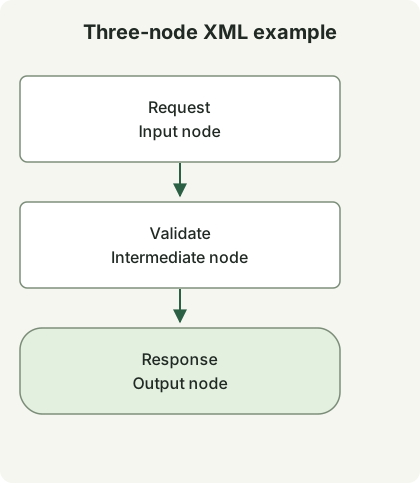
The figure shows the same three vertices and two directed connections as the XML below. It is rendered for this article; it is not a screenshot or an export from the editor.
Save as request-flow.drawio
<mxfile host="app.diagrams.net">
  <diagram id="request-flow" name="Request flow">
    <mxGraphModel>
      <root>
        <mxCell id="0"/>
        <mxCell id="1" parent="0"/>
        <mxCell id="request" value="Request" style="rounded=1;whiteSpace=wrap;html=1;" vertex="1" parent="1">
          <mxGeometry x="40" y="40" width="160" height="60" as="geometry"/>
        </mxCell>
        <mxCell id="validate" value="Validate" style="rounded=1;whiteSpace=wrap;html=1;" vertex="1" parent="1">
          <mxGeometry x="40" y="160" width="160" height="60" as="geometry"/>
        </mxCell>
        <mxCell id="response" value="Response" style="rounded=1;whiteSpace=wrap;html=1;" vertex="1" parent="1">
          <mxGeometry x="40" y="280" width="160" height="60" as="geometry"/>
        </mxCell>
        <mxCell id="first" edge="1" parent="1" source="request" target="validate" style="endArrow=block;">
          <mxGeometry relative="1" as="geometry"/>
        </mxCell>
        <mxCell id="second" edge="1" parent="1" source="validate" target="response" style="endArrow=block;">
          <mxGeometry relative="1" as="geometry"/>
        </mxCell>
      </root>
    </mxGraphModel>
  </diagram>
</mxfile>
mxCell elements with vertex="1" define the three nodes. The two edges refer to their source and target IDs, while mxGeometry supplies positions and sizes. Changing a visible label is different from changing the ID that an edge references.
Open the file in the editor. The complete file includes the outer mxfile and diagram elements. If you use Extras → Edit Diagram instead, the source editor documentation describes the current page’s mxGraphModel; do not confuse that page fragment with the complete file wrapper.
| File | Purpose |
|---|---|
request-flow.drawio |
Editable source under version control |
request-flow.svg or .png |
A sharing/rendering output; inspect whether diagram data is embedded |
After a change, reopen the source, confirm each arrow’s direction and export a new sharing image. Review both the source diff and the rendered result: formatting changes can obscure a small relationship change.
The example’s XML structure, unique IDs and connector references are checked locally. Cloud storage, editor UI interaction and export round trips are outside those checks. Choose storage integrations separately for the account and editor you use. The code-search guide shows how to narrow the files you inspect in a repository.
Discussion