Search Code with GitHub, Sourcegraph and Local Git
Start code search by fixing the repository and file scope, then inspect the matched implementation in context. A matching symbol name is a lead; it is not evidence that the code matches your dependency version or intended behavior.
GitHub code search, Sourcegraph and a local checkout search different available data. Use the tool that can access the repository you need; do not assume a public instance indexes every repository or revision.
Processing flow
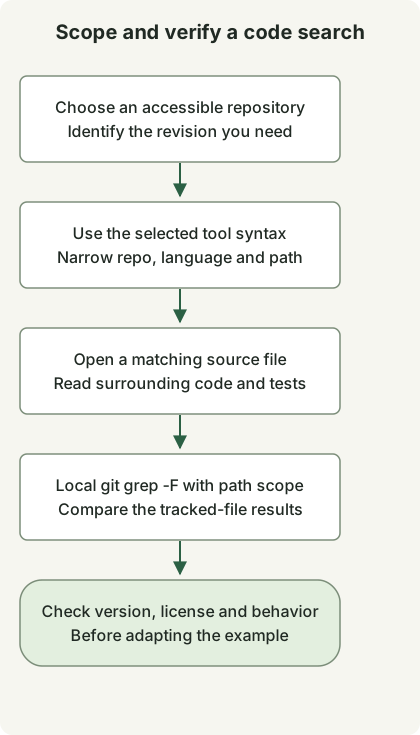
Scope the query before expanding the result list. When a version matters, open the intended revision or search a checkout of that revision rather than relying on the default branch.
Use each service’s own query language
A GitHub code-search query can combine these qualifiers with a quoted phrase:
repo:spring-projects/spring-framework language:java path:WebClient.java "interface WebClient"The corresponding Sourcegraph filters use repository and file regular expressions:
repo:^github\.com/spring-projects/spring-framework$ lang:java file:WebClient\.java$ "interface WebClient"| Intent | GitHub code search | Sourcegraph |
|---|---|---|
| Repository | repo:owner/name |
repo: regular expression; anchor when exact matching matters |
| Java | language:java |
lang:java or language:java |
| File scope | path: path filter |
file: regular expression |
| Exact phrase | Quoted phrase | Quoted phrase in keyword mode |
These are query-construction examples, not measured live result counts. The two path filters need not return identical sets: the Sourcegraph example anchors the filename suffix. Access, indexed content and selected revision still determine what you can find.
Reproduce the local search in an empty directory
This small fixture needs Git and a POSIX shell. mkdir deliberately fails if demo-search already exists, so choose a fresh working directory.
set -eu
mkdir demo-search
cd demo-search
git init -q
mkdir src docs
printf '%s\n' 'interface WebClient {}' > src/WebClient.java
printf '%s\n' 'interface WebClient is discussed here' > docs/notes.txt
git add src docs
git grep -n -F 'interface WebClient' -- src
Output:
src/WebClient.java:1:interface WebClient {}The same phrase exists in docs/notes.txt, but -- src restricts the search. git grep -F treats the pattern as a fixed string, and -n reports line numbers. The files were added to the index because the default working-tree search uses tracked files; this example does not create a commit. To inspect a real checkout, replace the fixture path and pattern while retaining the scope you intend.
Before adapting a result, read its callers, tests, license and revision. A matching declaration can have different behavior in another release. Use the WebClient response tests to check a client contract rather than inferring behavior from a search hit.
Discussion