Open and Run a Spring Boot Gradle Project in IntelliJ IDEA
When opening a Spring Boot project in IntelliJ, check Gradle synchronization first and compare the Wrapper build with IDE execution. A missing run button does not always require creating a manual configuration. You can also run a valid Java main method from the editor gutter icon.
This guide continues the Boot 4.1.2, Gradle 9.8.2, Java 17 Initializr example. The build and HTTP behavior ran locally; the IDE steps were checked against JetBrains documentation. This does not claim hands-on UI verification in a particular IDE release.
Processing flow
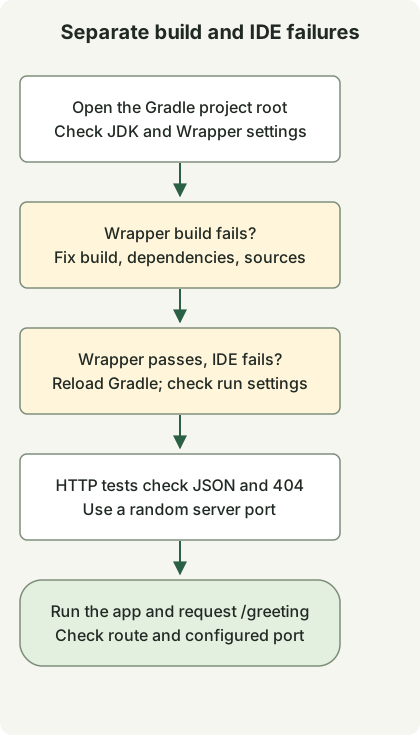
Use the Wrapper build to distinguish project failures from IDE setup. HTTP tests use a random port; manual bootRun uses the configured port.
Check the project and JDK
- Use File → Open on the extracted project root containing
settings.gradleandbuild.gradle. - Complete Gradle synchronization. Resolve dependency download or synchronization failures first.
- Select the project’s Wrapper distribution, then check the Gradle JVM and Project SDK. This example uses JDK 17 for both.
- Run
./gradlew --versionand./gradlew testin a terminal to establish a result outside the IDE.
See the Gradle integration guide and Gradle JVM selection rules. Menu labels vary with IDE version and OS. Project SDK, the JVM running Gradle, the Java toolchain, and the run configuration’s JRE are distinct settings and do not always match automatically.
Add an endpoint and real HTTP tests
Keep the four existing files and add these two. Placing the controller in the application’s example.demo package keeps it within component scanning.
src/main/java/example/demo/GreetingController.java
package example.demo;

import java.util.Map;
import org.springframework.web.bind.annotation.GetMapping;
import org.springframework.web.bind.annotation.RestController;

@RestController
public class GreetingController {
    @GetMapping("/greeting")
    public Map<String, String> greeting() {
        return Map.of("message", "Hello, Gradle");
    }
}
src/test/java/example/demo/GreetingHttpTest.java
package example.demo;

import java.net.URI;
import java.net.http.HttpClient;
import java.net.http.HttpRequest;
import java.net.http.HttpResponse;
import java.time.Duration;
import org.junit.jupiter.api.Test;
import org.springframework.beans.factory.annotation.Autowired;
import org.springframework.boot.test.context.SpringBootTest;
import org.springframework.core.env.Environment;

import static org.junit.jupiter.api.Assertions.*;

@SpringBootTest(webEnvironment = SpringBootTest.WebEnvironment.RANDOM_PORT)
class GreetingHttpTest {
    @Autowired Environment environment;

    HttpResponse<String> get(String path) throws Exception {
        String port = environment.getRequiredProperty("local.server.port");
        var request = HttpRequest.newBuilder(URI.create("http://127.0.0.1:" + port + path))
                .timeout(Duration.ofSeconds(10)).GET().build();
        return HttpClient.newHttpClient().send(request, HttpResponse.BodyHandlers.ofString());
    }

    @Test
    void greetingReturnsJson() throws Exception {
        var response = get("/greeting");
        assertEquals(200, response.statusCode());
        assertTrue(response.headers().firstValue("content-type").orElse("").contains("application/json"));
        assertEquals("{\"message\":\"Hello, Gradle\"}", response.body());
    }

    @Test
    void missingPathIsNotAnApplicationStartupFailure() throws Exception {
        assertEquals(404, get("/missing").statusCode());
    }
}
./gradlew test now runs the existing context test and two HTTP tests. The HTTP tests start a real server on a random port and check JSON output and a missing path’s 404 response. They do not require local port 8080 to be free.
Compare Gradle and Application execution
Start the server with the first command, then run the second command in another terminal.
./gradlew bootRun --args='--server.port=8081'curl --fail --show-error http://localhost:8081/greeting{"message":"Hello, Gradle"}In the IDE, try the run icon beside DemoApplication.main() first. If you need an explicit configuration, create an Application configuration under Run → Edit Configurations and check these values.
| Setting | Example |
|---|---|
| Main class | example.demo.DemoApplication |
| Classpath module | The project’s main source module, such as demo.main |
| JRE | JDK 17 |
| Program arguments | --server.port=8081 |
If an existing process occupies 8081, stop it or choose another port. Availability of Boot-specific tool windows or configurations is separate from running a normal Java Application configuration.
| Observation | Check first |
|---|---|
| The Wrapper build also fails | JDK/Gradle compatibility, dependencies, and source errors |
| Wrapper passes but IDE fails | Gradle reload, module classpath, run JRE and arguments |
Server starts but /greeting returns 404 |
Controller package and mapping path |
| Port-in-use failure | Existing processes and run instances |
If compilation succeeds but the IDE marks generated methods as errors, continue with Lombok and annotation processor checks.
Discussion