Create and Test a Gradle Project with Spring Initializr
After creating a project with Spring Initializr, test it with the generated Gradle Wrapper before relying on the IDE. Treat generation, dependency resolution, JDK compatibility, and application startup as separate checks so failures are easier to locate.
This example uses a Boot 4.1.2, Java 17, Gradle Groovy project actually generated by start.spring.io on October 27, 2026. Its Wrapper selected Gradle 9.8.2. The service’s defaults and available versions change, so do not assume this combination remains available indefinitely.
Processing flow
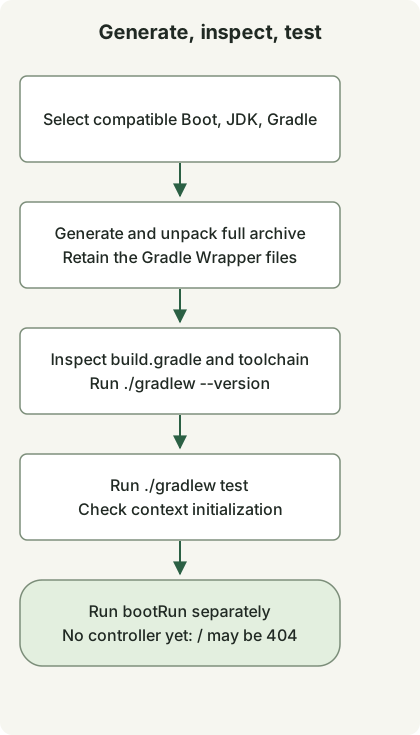
Generate the complete archive before running its Wrapper. A context test and a separately running HTTP application establish different things.
Choose the project settings
| Setting | Example | Meaning |
|---|---|---|
| Project / Language | Gradle - Groovy / Java | Build tooling and source language |
| Spring Boot | 4.1.2 | A final release available when this example was generated |
| Java / Packaging | 17 / Jar | Source toolchain and packaging |
| Group / Artifact | example / demo | Project identifiers |
| Package name | example.demo | Application package |
| Dependencies | Spring Web | Dependencies for an HTTP endpoint |
Click Generate in the UI or download the archive with this URL. Confirm each command succeeds before running the next one. Use an empty working directory to avoid overwriting an existing project.
curl --fail --show-error --location 'https://start.spring.io/starter.zip?type=gradle-project&language=java&bootVersion=4.1.2&baseDir=demo&groupId=example&artifactId=demo&name=Demo&packageName=example.demo&packaging=jar&javaVersion=17&dependencies=web' --output demo.zip
unzip demo.zip
cd demo
./gradlew --version
./gradlew test
The generation API may reject a version once the service stops offering it. Check the current service metadata and Initializr reference, then select compatible Boot, JDK, and Gradle versions together. Silently replacing an example with the latest defaults changes its reproduction conditions.
Inspect four core generated files
These are the four core files with formatting simplified. The full archive also includes Wrapper scripts, the Wrapper JAR and settings, and resource files. Copying only these four files into an empty directory does not create ./gradlew.
settings.gradle
rootProject.name = 'demo'build.gradle
plugins {
    id 'java'
    id 'org.springframework.boot' version '4.1.2'
    id 'io.spring.dependency-management' version '1.1.7'
}
group = 'example'
version = '0.0.1-SNAPSHOT'
java {
    toolchain { languageVersion = JavaLanguageVersion.of(17) }
}
repositories { mavenCentral() }
dependencies {
    implementation 'org.springframework.boot:spring-boot-starter-webmvc'
    testImplementation 'org.springframework.boot:spring-boot-starter-webmvc-test'
    testRuntimeOnly 'org.junit.platform:junit-platform-launcher'
}
tasks.named('test') { useJUnitPlatform() }
src/main/java/example/demo/DemoApplication.java
package example.demo;

import org.springframework.boot.SpringApplication;
import org.springframework.boot.autoconfigure.SpringBootApplication;

@SpringBootApplication
public class DemoApplication {
    public static void main(String[] args) {
        SpringApplication.run(DemoApplication.class, args);
    }
}
src/test/java/example/demo/DemoApplicationTests.java
package example.demo;

import org.junit.jupiter.api.Test;
import org.springframework.boot.test.context.SpringBootTest;

@SpringBootTest
class DemoApplicationTests {
    @Test
    void contextLoads() {}
}
The generated Boot 4.1.2 project uses spring-boot-starter-webmvc and spring-boot-starter-webmvc-test. Start from the configuration generated for your selected release instead of mixing fragments from different Boot generations. The Boot 4.1.2 requirements specify Java 17 or later and Gradle 8.x from 8.14 onward, or 9.x.
Distinguish tests from application startup
A passing contextLoads() means the test context starts. With no controller yet, a 404 response from / does not indicate startup failure. Run the application separately and stop it with Ctrl+C in that terminal.
./gradlew bootRunCommit the generated build.gradle and Gradle Wrapper files together. The Gradle version is separate from the Java version in java.toolchain. Use ./gradlew --version to inspect the JVM running Gradle, and distinguish it from the JDK selected for compilation and application execution.
Continue with opening the project in IntelliJ and serving HTTP. See Spring Boot release history and version relationships for why Boot and Framework use different version numbers.
Discussion