Spring Boot Release History and Spring Framework Version Mapping
Spring Boot and Spring Framework are separate projects with different version numbers. Boot adds auto-configuration, dependency management, and executable packaging around Framework. Reading Boot 3.1 as Framework 6.1 is therefore unreliable; inspect the selected Boot release’s BOM and resolved dependency graph instead.
Processing flow
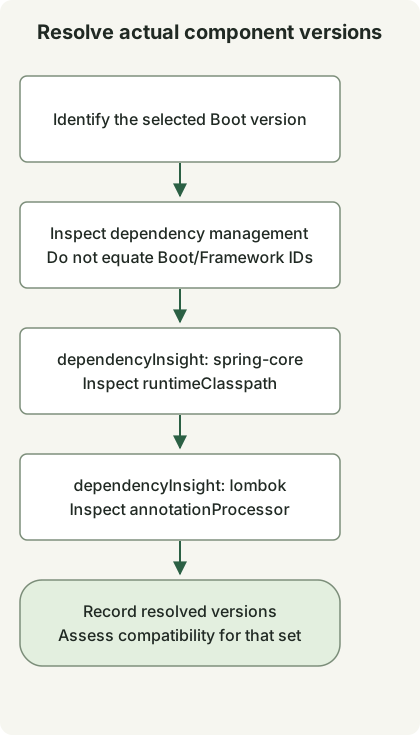
The flow summarizes dependency inspection rather than a release timeline. Boot, Framework and Lombok have separate version identities and dependency configurations.
Changes in selected final releases
This timeline highlights feature transitions rather than listing every release. Distinguish the first final release from expanded JDK compatibility in later patches.
| Spring Boot | First final release | Selected changes and official announcement |
|---|---|---|
| 1.2 | 2014-12-11 | @SpringBootApplication and Servlet 3.1 support |
| 1.3 | 2015-11-16 | DevTools, caching auto-configuration, and directly executable JARs |
| 1.4 | 2016-07-28 | Startup failure analysis and improved testing support |
| 2.0 | 2018-03-01 | Framework 5.0, a Java 8 baseline, and reactive web support |
| 3.0 | 2022-11-24 | Framework 6.0, a Java 17 baseline, Jakarta, and native images |
| 3.1 | 2023-05-18 | Development-time Testcontainers and Docker Compose integration |
| 3.2 | 2023-11-23 | Virtual threads, RestClient, and JdbcClient support |
| 4.0 | 2025-11-20 | Framework 7, modularization, JSpecify, and API versioning |
For example, the Boot 3.1.0 managed dependency list specifies spring-core 6.0.9. There is no requirement for Boot and Framework minor version numbers to match. Mapping Boot 2.4 to a nonexistent Framework 5.4 line is also incorrect.
Starters, BOMs, and build plugins
A starter groups dependencies needed for a feature. A BOM manages versions; it does not automatically add every library in that list to your project. Boot’s build plugin provides tasks such as bootRun and executable JAR packaging.
For Gradle, the Boot dependency management guide describes the dependency-management plugin and native BOM support. Applying the Boot plugin alone does not establish that all Gradle configurations accept versionless dependencies. Check separate configurations such as annotation processors too.
Inspect your project’s actual versions
Run these commands in the final project from the Initializr and Lombok guides.
./gradlew dependencyInsight --configuration runtimeClasspath --dependency spring-core
./gradlew dependencyInsight --configuration annotationProcessor --dependency lombok
The local example resolves Boot 4.1.2, spring-core 7.0.10, and Lombok 1.18.48. Different numbers reflect different projects. dependencyInsight shows the selected version and the dependency paths or rules responsible for it, making it useful for investigating conflicts. These values record this example, not future defaults or a universal project combination.
The timeline is not a current support-lifecycle table. When creating or upgrading a project, check the selected release’s requirements, dependency compatibility, and support policy separately. See Java 17 and Jakarta migration for moving to Boot 3, or IntelliJ and Gradle execution checks for running locally.
Discussion