Verify a Downloaded File’s SHA-256 Checksum with Python
On this page
To verify a downloaded file, calculate its SHA-256 digest and compare it with the expected value from a publisher you trust. Python’s hashlib can hash the binary bytes in chunks. A match checks those bytes against that value; it does not authenticate the publisher or prove the program is safe. Adoptium documents signature verification separately.
Which checksum should you compare?
Use the checksum for the exact release, OS, CPU and archive format you downloaded. The GitHub release selector chooses an asset URL; the Temurin metadata example also checks checksum syntax. Neither hashes the downloaded file. Adoptium’s archive installation instructions describe obtaining the accompanying checksum.
Get the expected value through the publisher’s trusted distribution channel. Computing a digest from the downloaded file and then using that same result as its expected value cannot detect an incorrect download. If an attacker can replace both the file and its advertised checksum, matching them does not establish authenticity. Verifying a signature with a trusted publisher key is a separate step, outside this example.
How does the file check work?
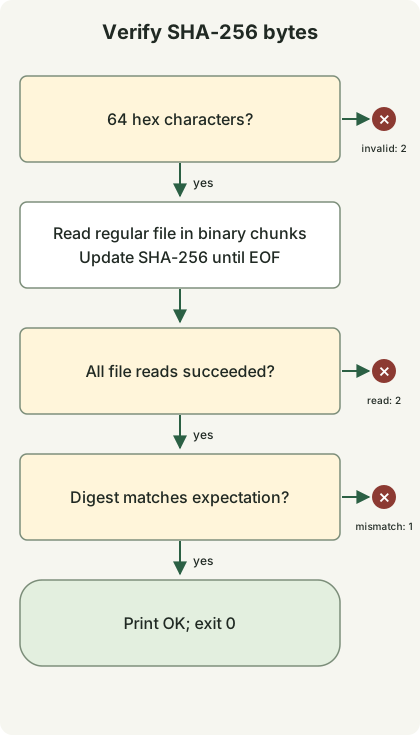
Validate the expected value, open a stable regular file in binary mode, update the digest with chunks until EOF, and compare. Invalid input or a read error returns 2; a mismatch returns 1; only a match returns 0. The diagram summarizes the chunk loop in one step. Do not modify or replace the file during or after verification before using it. This is not an atomic verification-and-execution tool.
Run a verifier with no extra packages
Use Python 3.11 or later and save the following as verify-sha256.py. The commands below use a POSIX shell. The program reads local files; it does not download, unpack or run them. It follows a symlink if it points to a regular file. It accepts a single 64-character hexadecimal value, including uppercase, rather than a checksum manifest, filename or URL.
verify-sha256.py
import hashlib
from pathlib import Path
import re
import sys


def main(argv):
    if len(argv) != 3 or not re.fullmatch(r"[0-9a-fA-F]{64}", argv[1]):
        print("usage: verify-sha256.py EXPECTED_SHA256 FILE", file=sys.stderr)
        return 2
    path = Path(argv[2])
    try:
        if not path.is_file():
            raise OSError("expected an existing regular file")
        digest = hashlib.sha256()
        with path.open("rb") as source:
            for chunk in iter(lambda: source.read(1024 * 1024), b""):
                digest.update(chunk)
    except OSError as error:
        print(f"READ ERROR: {error}", file=sys.stderr)
        return 2
    if digest.hexdigest() != argv[1].lower():
        print("MISMATCH", file=sys.stderr)
        return 1
    print("OK")
    return 0


if __name__ == "__main__":
    raise SystemExit(main(sys.argv))
rb preserves the original bytes, including line endings. Each read requests at most 1 MiB; the file is not loaded in full. Invalid checksums are rejected before opening the path. Missing paths, directories and read errors share status 2. Named pipes and device files are outside the regular-file contract.
Reproduce a match and a changed file
Use a new empty directory. This fixture writes sample.bin as the three bytes abc and changed.bin as abcd. The fixed digest in the command belongs only to abc; it is not the checksum of a JDK archive.
make-samples.py
from pathlib import Path

Path("sample.bin").write_bytes(b"abc")
Path("changed.bin").write_bytes(b"abcd")
python3 make-samples.py
expected='ba7816bf8f01cfea414140de5dae2223b00361a396177a9cb410ff61f20015ad'
python3 verify-sha256.py "$expected" sample.bin
python3 verify-sha256.py "$expected" changed.bin
printf 'exit=%s\n' "$?"The matching file prints OK. The changed file prints MISMATCH to stderr, and the final command prints exit=1. When using set -e, an expected mismatch needs an explicit if or other error-handling branch; otherwise the shell can stop before the status is printed.
| Status | Meaning | Next action |
|---|---|---|
| 0 | Digest matches the supplied expectation | Continue only if that expectation came from a trusted source |
| 1 | Digests differ | Stop using this file; check the selected asset and download |
| 2 | Invalid arguments, checksum syntax or file read | Fix the input or file access, then retry |
A mismatch alone does not identify corruption, a wrong asset or malicious replacement as the cause. The check provides neither signature verification nor a malware scan.
Discussion