Implement a Redis rate limit: Lua atomicity and 429/503 responses
On this page
To limit requests from the same user across application servers, make the limit decision and update the counter together in Redis. This article implements a fixed-window limit in Lua, returning 429 when the limit is exceeded and 503 when Redis cannot determine the result.
The example policy permits at most three requests per account in the 10 seconds starting with the first allowed request. A fixed window is the simplest starting point here; it is not equivalent to a token bucket or sliding window. The environment is Spring Boot 3.5.16, JDK 21, Gradle 8.14.3 and Redis 8.2.1. These versions are pinned for reproduction, not recommended as the latest production patches.
Why not use GET followed by INCR in the application?
If servers A and B both read a counter of 2, they may allow both requests even when the limit is 3. JVM synchronized does not lock other processes. INCR is atomic, but it does not automatically include the preceding admission decision.
Sending a separate EXPIRE after INCR has another problem: if the client stops between commands, the key may have no TTL. Redis’s official INCR rate-limit example also explains this race and the use of Lua.
On the first request, the script below creates the value and TTL together with SET ... PX. For later requests, it checks the limit inside Lua and increments only allowed requests. Rejected requests change neither the counter nor its expiration.
In what order is the limit applied?
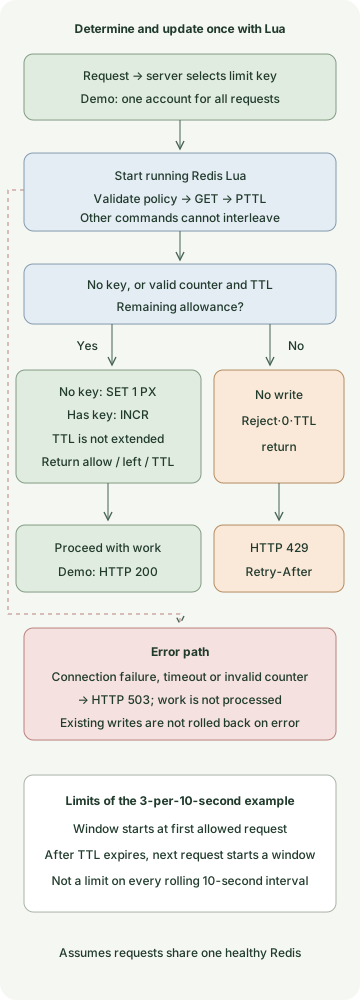
The blue area is the decision inside Redis; the application creates the HTTP response. A missing key starts a new window. An existing key must contain a positive integer counter and a valid TTL. The limit counts admissions, and a count is not refunded if work fails after admission.
Implement the limit with Spring MVC and Redis Lua
Save these six files in one Gradle project. Authentication is not implemented. /demo treats every request as the single demo-account, so the key is a fixed example for reproducing a per-user policy. The server binds only to a local address.
In a real service, derive the key from a server-verified principal, such as an authenticated Principal. Trusting an arbitrary userId request header lets callers evade a limit by changing it. For example, rl:orders:v1:<tenant-and-subject-digest> can distinguish operation scope, policy version and subject; consider an identifier such as a server-secret HMAC instead of raw personal data. Interpret forwarded IP headers only within a trusted proxy boundary.
settings.gradle
rootProject.name = 'redis-lua-rate-limit'build.gradle
plugins {
    id 'java'
    id 'application'
}
repositories { mavenCentral() }
java { toolchain { languageVersion = JavaLanguageVersion.of(21) } }
dependencies {
    implementation platform('org.springframework.boot:spring-boot-dependencies:3.5.16')
    implementation 'org.springframework.boot:spring-boot-starter-web'
    implementation 'org.springframework.boot:spring-boot-starter-data-redis'
    testImplementation 'org.springframework.boot:spring-boot-starter-test'
    testRuntimeOnly 'org.junit.platform:junit-platform-launcher'
}
application { mainClass = 'example.RateLimitApplication' }
test {
    useJUnitPlatform()
    systemProperty 'demo.redis.port', providers.gradleProperty('redisPort').getOrElse('6379')
}
src/main/resources/application.yml
server:
  address: 127.0.0.1
spring:
  data:
    redis:
      host: 127.0.0.1
      port: ${REDIS_PORT:6379}
      connect-timeout: 200ms
      timeout: 200ms
src/main/resources/rate-limit.lua
local limit = tonumber(ARGV[1])
local window = tonumber(ARGV[2])
if not limit or limit < 1 or limit > 1000000 or limit ~= math.floor(limit)
   or not window or window < 1 or window > 3600000 or window ~= math.floor(window) then
    return redis.error_reply('invalid rate limit policy')
end

local raw = redis.call('GET', KEYS[1])
if raw then
    local count = tonumber(raw)
    local ttl = redis.call('PTTL', KEYS[1])
    if not count or count < 1 or count ~= math.floor(count) or ttl < 0 then
        return redis.error_reply('invalid counter state')
    end
    if count >= limit then
        return {0, 0, ttl}
    end
    local updated = redis.call('INCR', KEYS[1])
    return {1, limit - updated, ttl}
end

redis.call('SET', KEYS[1], 1, 'PX', window)
return {1, limit - 1, window}
src/main/java/example/RedisRateLimiter.java
package example;

import java.time.Duration;
import java.util.List;
import org.springframework.core.io.ClassPathResource;
import org.springframework.data.redis.core.StringRedisTemplate;
import org.springframework.data.redis.core.script.DefaultRedisScript;
import org.springframework.stereotype.Component;

@Component
public class RedisRateLimiter {
    private static final DefaultRedisScript<List> SCRIPT = new DefaultRedisScript<>();
    static {
        SCRIPT.setLocation(new ClassPathResource("rate-limit.lua"));
        SCRIPT.setResultType(List.class);
    }
    private final StringRedisTemplate redis;

    public RedisRateLimiter(StringRedisTemplate redis) {
        this.redis = redis;
    }

    public Decision check(String key, int limit, Duration window) {
        long milliseconds = window.toMillis();
        if (key == null || key.isBlank() || key.length() > 160 || limit < 1 || limit > 1_000_000
                || milliseconds < 1 || milliseconds > 3_600_000) {
            throw new IllegalArgumentException("Invalid rate limit policy");
        }
        List<?> result = redis.execute(SCRIPT, List.of(key),
                Integer.toString(limit), Long.toString(milliseconds));
        if (result == null || result.size() != 3) {
            throw new IllegalStateException("Invalid limiter result");
        }
        return new Decision(((Number) result.get(0)).longValue() == 1,
                ((Number) result.get(1)).longValue(), ((Number) result.get(2)).longValue());
    }

    public record Decision(boolean allowed, long remaining, long ttlMillis) {
        public long retryAfterSeconds() {
            return Math.max(1, (ttlMillis + 999) / 1000);
        }
    }
}
src/main/java/example/RateLimitApplication.java
package example;

import java.time.Duration;
import org.springframework.boot.SpringApplication;
import org.springframework.boot.autoconfigure.SpringBootApplication;
import org.springframework.dao.DataAccessException;
import org.springframework.http.ResponseEntity;
import org.springframework.web.bind.annotation.GetMapping;
import org.springframework.web.bind.annotation.RestController;

@SpringBootApplication
@RestController
public class RateLimitApplication {
    private final RedisRateLimiter limiter;

    public RateLimitApplication(RedisRateLimiter limiter) {
        this.limiter = limiter;
    }

    public static void main(String[] args) {
        SpringApplication.run(RateLimitApplication.class, args);
    }

    @GetMapping("/demo")
    public ResponseEntity<String> demo() {
        try {
            var decision = limiter.check("rl:demo:v1:demo-account", 3, Duration.ofSeconds(10));
            if (!decision.allowed()) {
                return ResponseEntity.status(429)
                        .header("Retry-After", Long.toString(decision.retryAfterSeconds()))
                        .body("rate limit exceeded\n");
            }
            return ResponseEntity.ok("ok\n");
        } catch (DataAccessException | IllegalStateException unavailable) {
            return ResponseEntity.status(503).body("limiter unavailable\n");
        }
    }
}
This script uses one key. In Redis Cluster it runs in the slot containing that key. Extending one script to limit multiple keys requires redesigning around the same-slot constraint.
StringRedisTemplate uses string keys and arguments; the script’s numeric array is returned as a List. The reason to reuse DefaultRedisScript, and the default executor’s EVALSHA followed by EVAL on a cache miss, are described in the Spring Data Redis scripting documentation.
What responses should you expect?
Run this with Docker available and Redis port 16379 and application port 8080 unused by other processes. Redis is exposed only on the host’s loopback address; persistence and persistent volumes are disabled. The first run downloads the Redis image and Maven dependencies, so it needs network access.
docker run --rm -d --name redis-rate-limit-demo \
  -p 127.0.0.1:16379:6379 \
  redis:8.2.1-alpine@sha256:987c376c727652f99625c7d205a1cba3cb2c53b92b0b62aade2bd48ee1593232 \
  redis-server --save '' --appendonly no
REDIS_PORT=16379 gradle run
After the server is ready, make four calls within 10 seconds from another terminal.
for attempt in 1 2 3 4; do
  curl -s -o /dev/null -w '%{http_code}\n' http://127.0.0.1:8080/demo
done
curl -i http://127.0.0.1:8080/demo
Sending those four requests consecutively in a new window should produce these status codes:
200
200
200
429
The rejection’s Retry-After is the remaining TTL rounded up to whole seconds, with a minimum of one second. Its value varies with the time of the call. The meaning of 429 and optional Retry-After follows RFC 6585 section 4. It is not a reservation accounting for other requests: a retry can still be rejected if another request uses the allowance in the meantime.
Stop gradle run and remove the test container.
docker stop redis-rate-limit-demoWhat was verified for concurrency and errors?
Separate reproduction tests used real Redis in local Docker and embedded Tomcat. These checks verify behavior, not throughput.
| Condition | Observed result |
|---|---|
| 40 simultaneous calls for one key from a thread pool | 3 allowed; Redis counter 3 |
| Two limiter objects using the same Redis and key | Share the limit. The objects share one client bean; the test did not start two separate JVMs. |
| Request after three allowed calls | Rejected, with no counter increment or TTL extension |
| A different account key and an expired key | Other key allowed independently; a new window starts after expiration |
| Invalid value or key without TTL | Error without arbitrary repair |
| Consecutive real HTTP calls | Three 200 responses followed by 429 with Retry-After |
| HTTP request with an invalid counter | 503 |
| Separate TCP endpoint accepts connections but gives no Redis response | Limiter error mapped to 503 |
A validated counter must have a TTL. The PTTL documentation defines -1 as no TTL and -2 as a missing key. Quietly adding a TTL and allowing a request when existing state is invalid could hide a policy error, so this implementation returns an error.
Atomic Lua execution does not mean writes are automatically rolled back on error. Distinguish execution isolation from error handling as described in the official scripting documentation. A reproduction test also confirmed that a value remained after a separate script executed SET and then deliberately returned an error. The script in this article validates input and existing state before writing, with the only write as the final SET or INCR.
What limits and failure policies should you choose in production?
A fixed window does not guarantee at most three requests in every consecutive 10-second interval. Using the remaining allowance just before a window ends and requesting again immediately after the next window starts can concentrate requests in a short period. Consider sliding logs or sliding windows for an accurate moving total over a period, or a token bucket to set average arrival rate and allowed burst separately. This article does not implement or benchmark those algorithms.
This example uses fail-closed behavior: Redis errors do not let requests through. That can be appropriate where bypassing a limit is costly, such as payment operations, but a Redis problem also reduces API availability. Where availability matters more, such as a read API, temporarily allowing requests under a limited local bucket is another option. The total allowance can grow with the number of servers, so it is not the same guarantee as a global limit.
The 200ms setting is a connection and command timeout, not a guarantee that the whole HTTP request finishes within 200ms. Consider queueing, reconnection and scheduling time separately. The code adds no application-level retry; also check the client’s reconnection and command retransmission policies. If Redis records an admission and the response is lost, the count may be consumed even though the caller sees failure. If a retried request must count only once, a request identifier and separate idempotency policy are required.
If a Redis key is evicted under memory pressure or its counter is lost during restart or failover, a subsequent request may start a new window and be allowed. Atomic Lua alone does not provide a global limit covering replication and recovery. Manage dedicated instances, memory limits, eviction policy, policy-versioned keys, rejection and Redis error counts, and limit-decision latency. Putting per-key identifiers directly into metric labels also increases cardinality.
This reproduction covers normal operation with a single Redis instance and some error handling. It does not test Redis Cluster failover, multiple regions, recovery after an actual Redis process outage, or production-load performance. Limiting request starts also does not limit concurrent DB occupancy or the number of long-running requests, so apply separate concurrency limits where needed.
Discussion