Implementing Rate Limits with Bucket4j: Local Token Buckets and Distributed Limits
On this page
Bucket4j is a Java rate-limiting library that calculates token-bucket refills and consumption and controls concurrency. Sharing a bucket in Spring and attempting to consume a token for each request lets you set the permitted burst and subsequent refill rate separately. Local buckets are independent per JVM, so adding the library alone does not create a global limit across servers.
The previous Redis Lua rate-limiting article implemented a fixed window that counts requests for a period starting with the first allowed request. This article implements a single-JVM token bucket with capacity 5 and a refill of 5 tokens over 10 seconds, then explains what changes when moving to Redis distributed mode.
The reproduction environment is Bucket4j 8.22.0, Spring Boot 3.5.16, JDK 21 and Gradle 8.14.3. The Bucket4j version was pinned against the official releases and the 8.22.0 reference. The jdk17 in the dependency name denotes an artifact for the JDK 17 family; the example runs it on JDK 21.
How do capacity and refill rate differ?
capacity(5) is the maximum number of tokens that can accumulate. The default initial count is also five, so five requests can be allowed at once initially. refillGreedy(5, Duration.ofSeconds(10)) sets a rate of five tokens over ten seconds. If one request consumes one token, after consuming all tokens at t=0, one new token is available at t=2 seconds.
It would therefore be incorrect to describe this policy as “at most five requests in any consecutive ten seconds”: it permits both the initial burst of five and subsequent refills. Even after a long idle period, the bucket accumulates no more than its capacity of five.
| Refill method, with the same capacity and refill amount | refillGreedy(5, 10 seconds) |
refillIntervally(5, 10 seconds) |
|---|---|---|
Consume all five at t=0 |
0 remaining | 0 remaining |
Check at t=2 seconds without further consumption |
1 available | 0 |
Check at t=10 seconds without further consumption |
5 | 5 |
Greedy refills gradually as time passes; Intervally refills in a batch after the period ends. The table was checked with a controlled clock starting at zero. No separate scheduler needs to add tokens periodically: elapsed time is reflected in the refill calculation when the bucket is queried or consumed. See the Bucket4j reference on refill for API details.
How can Spring MVC requests be limited?
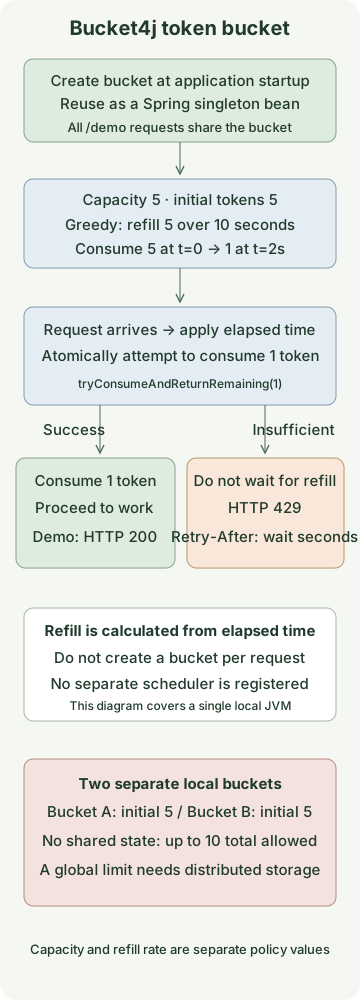
The controller uses the result of tryConsumeAndReturnRemaining(1) instead of querying the token count separately and guessing whether to allow the request. A ConsumptionProbe returns success, remaining tokens and, when insufficient, the wait time for that same consumption attempt.
Save the following five files in one project. All /demo requests share one bucket. The example does not implement per-user authentication or a bucket store, and the server binds only to a local address.
settings.gradle
rootProject.name = 'bucket4j-token-bucket'build.gradle
plugins {
    id 'java'
    id 'application'
}
repositories { mavenCentral() }
java { toolchain { languageVersion = JavaLanguageVersion.of(21) } }
dependencies {
    implementation platform('org.springframework.boot:spring-boot-dependencies:3.5.16')
    implementation 'org.springframework.boot:spring-boot-starter-web'
    implementation 'com.bucket4j:bucket4j_jdk17-core:8.22.0'
    testImplementation 'org.springframework.boot:spring-boot-starter-test'
    testRuntimeOnly 'org.junit.platform:junit-platform-launcher'
}
application { mainClass = 'example.RateLimitApplication' }
test { useJUnitPlatform() }
src/main/resources/application.yml
server:
  address: 127.0.0.1
src/main/java/example/BucketPolicy.java
package example;

import java.time.Duration;
import io.github.bucket4j.Bucket;
import io.github.bucket4j.TimeMeter;

public final class BucketPolicy {
    private BucketPolicy() {}

    public static Bucket local(TimeMeter clock) {
        return Bucket.builder()
                .withCustomTimePrecision(clock)
                .addLimit(limit -> limit.capacity(5).refillGreedy(5, Duration.ofSeconds(10)))
                .build();
    }
}
src/main/java/example/RateLimitApplication.java
package example;

import io.github.bucket4j.Bucket;
import io.github.bucket4j.TimeMeter;
import org.springframework.boot.SpringApplication;
import org.springframework.boot.autoconfigure.SpringBootApplication;
import org.springframework.context.annotation.Bean;
import org.springframework.http.ResponseEntity;
import org.springframework.web.bind.annotation.GetMapping;
import org.springframework.web.bind.annotation.RestController;

@SpringBootApplication
public class RateLimitApplication {
    public static void main(String[] args) {
        SpringApplication.run(RateLimitApplication.class, args);
    }

    @Bean
    Bucket demoBucket() {
        return BucketPolicy.local(TimeMeter.SYSTEM_NANOTIME);
    }

    @RestController
    public static class DemoController {
        private final Bucket bucket;

        public DemoController(Bucket bucket) {
            this.bucket = bucket;
        }

        @GetMapping("/demo")
        public ResponseEntity<String> demo() {
            var probe = bucket.tryConsumeAndReturnRemaining(1);
            if (probe.isConsumed()) {
                return ResponseEntity.ok("ok\n");
            }
            long seconds = Math.max(1, Math.ceilDiv(probe.getNanosToWaitForRefill(), 1_000_000_000L));
            return ResponseEntity.status(429)
                    .header("Retry-After", Long.toString(seconds))
                    .body("rate limit exceeded\n");
        }
    }
}
The Bucket is a default singleton Spring bean so that it retains state across requests. Calling Bucket.builder() inside the controller method each time creates initial tokens for every request. The presence of a check would not enforce a real limit.
When tokens are insufficient, tryConsumeAndReturnRemaining returns a rejection rather than making the request thread wait for refill. This does not make the entire MVC server non-blocking. Choosing a separate waiting API requires reconsidering thread waits and request timeouts.
What responses should you expect?
Run this with JDK 21 and Gradle 8.14.3 installed and port 8080 available. Neither the Boot Gradle plugin nor a separate Redis server is needed. Maven Central dependencies are downloaded on the first run.
gradle runOnce the server is ready, call it from another terminal. This assumes a fresh bucket with no other calls and all six calls finishing before the next token refill.
for attempt in 1 2 3 4 5 6; do
  curl -s -o /dev/null -w '%{http_code}\n' http://127.0.0.1:8080/demo
done
curl -i http://127.0.0.1:8080/demo
The expected status codes follow. If execution takes longer or other requests intervene, refill and consumption can change the result.
200
200
200
200
200
429
The rejected response’s Retry-After is getNanosToWaitForRefill() rounded up to seconds, with a minimum of one second. With a controlled clock, it was 2 immediately after consuming all five tokens and 1 after 1.5 seconds. As described by HTTP 429’s Retry-After semantics, it tells the client how long to wait before retrying. Another request may consume the next token first, so waiting does not reserve a subsequent allowance.
Stop the example server with Ctrl+C in the terminal running gradle run.
Because the token is consumed before work starts, this code does not return it if the work later fails. Distinguish a limit on started requests from one on successful operations.
How were concurrent requests and timing checked?
The ten reproduction tests use real Bucket4j 8.22.0 and inject a controllable clock into TimeMeter. They do not use Thread.sleep to wait for time to pass. The official Intervally refill test also demonstrates time injection.
| Test condition | Observed result |
|---|---|
| 40 calls from 8 worker threads to one bucket, clock fixed | Exactly 5 allowed |
| Just before and exactly 2 seconds after consuming 5 | Rejected just before; 1 allowed at 2 seconds |
| Long elapsed time | Never exceeds capacity 5 |
| Same clock applied to Greedy and Intervally | Refill difference matches the table above |
| Time elapses after rejection | Rejection does not postpone the refill start |
| Two independent buckets | 5 each, 10 total can be consumed |
| Recreate the bucket on every request | 40 requests allowed by 40 new buckets, reproducing a bypass |
| Separate bucket with two bandwidth limits | Both limits must be satisfied to consume |
Spring MVC MockMvc calls |
200, 429 and wait-time rounding to seconds verified |
The MockMvc check is distinct from a real network request. Separately, the packaged application was started on embedded Tomcat and an actual HTTP 200 response was verified. The concurrent call count is an input to a behavior check, not a throughput benchmark.
When should you choose Redis Lua or Bucket4j?
| Criterion | Previous Redis Lua example | Local Bucket4j example here |
|---|---|---|
| Policy | Allowed requests during a period starting with the first request | Initial burst and subsequent refill rate |
| Shared state | Requests using the same Redis and key | Requests using the same bucket object in one JVM |
| External store call per request | Requires Redis execution | None |
| Effect of adding servers | Assumes state is shared for the same key | Independent buckets increase the total allowance |
This is not a claim that Redis supports only fixed windows or that Bucket4j supports only local mode. It compares the policies and storage locations implemented in these two articles.
For a global limit, consider Bucket4j’s distributed-store integration. The 8.22.0 reference on Redis integration uses a ProxyManager and bucket state under a common key through Lettuce or another client. In the described CAS approach, the client reads and calculates state, then compares and replaces it in Redis; a failed comparison under contention is retried. This differs from the preceding example, which performs the entire bucket calculation in one Redis Lua execution.
Distributed-state expiration is also part of the limiting policy. If a short TTL deletes a bucket while tokens are still insufficient, the next access may create a new bucket with initial tokens and allow additional requests. As in the official expiration strategy, account for the time needed to fully refill the bucket plus a margin. That does not provide the same guarantee against forced eviction or data loss.
The SYSTEM_NANOTIME used here is for local buckets. Do not arbitrarily use it as a distributed time reference across JVMs. For a distributed implementation, follow the integration’s time reference, timeout and CAS retry settings. Separately decide whether to block requests when Redis fails or temporarily allow them under a bounded local policy. The code here does not execute Redis integration or failover.
For per-user limits, derive the bucket key from the authenticated principal and policy scope. Blindly trusting an arbitrary request-header identifier lets clients evade a limit by changing the key. Continuously adding per-user buckets to a local Map increases memory use, and careless eviction or recreation can repeatedly grant initial tokens. Decide where and how long state is retained.
Limiting request starts does not also limit the number of long-running operations occupying resources concurrently. If the goal is to protect database connections or concurrent external API calls, design a separate concurrency limit as well.
Discussion