T3 Code Guide: From a Small Code Change to Diff and Test Verification
On this page
T3 Code connects coding agents installed on your computer to a project, conversation, permissions and changed-files interface. When delegating code to an agent, a small scope and verifiable completion criteria matter more than a long request. This guide follows a numeric Retry-After parser fix from the request through diff and test verification.
The subject is the official T3 Code project. It is separate from the T3 Stack, which creates web apps with create-t3-app. The official README describes connecting existing providers including Codex, Claude Code and Cursor. Installing T3 Code and preparing a provider’s login and subscription/API terms are separate steps.
The baseline is the v0.1.9 release, checked on November 12, 2026. The example was checked on macOS with Node.js 24.13.0 and Git; the T3 Code CLI help and local server startup were checked too. No AI task was sent to a provider. The reference solution below is a directly tested implementation, not actual output generated by T3 Code or a model-performance measurement.
How do T3 Code and the provider divide responsibilities?
T3 Code displays the working project and thread, provider selection, permission requests and changes. The connected agent reads and modifies files or runs commands. Seeing a tool call does not mean tests were automatically run and passed: inspect the command and returned result.
Following the installation guide, install the provider you will use and complete authentication on the computer running the T3 Code server. This exercise starts by choosing an already prepared provider. There is no need to paste login details or API keys into the prompt.
Prepare a small Git project and failing tests
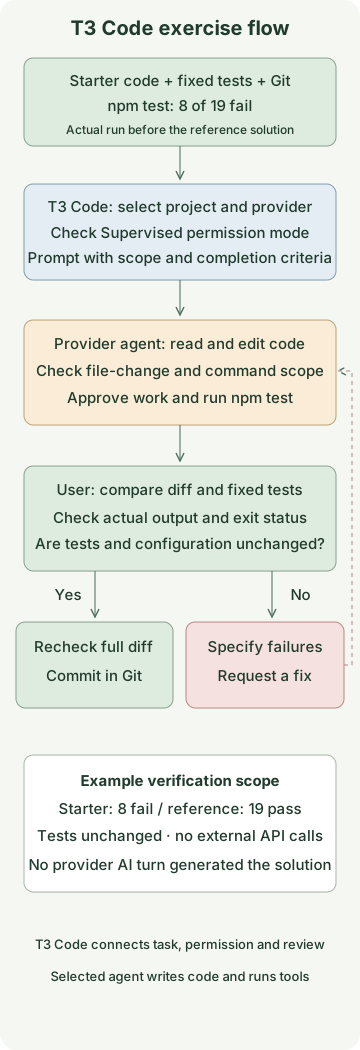
Save these three files in a new t3-code-example folder. These Node tests use no external packages or API calls. Of the two Retry-After forms, this exercise supports only delay-seconds, integer seconds. HTTP-date is outside scope and must return null. For the full header grammar see RFC 9110’s definition of Retry-After.
package.json
{
  "name": "t3-code-retry-after-example",
  "private": true,
  "type": "module",
  "engines": { "node": ">=24" },
  "scripts": { "test": "node --test retry-after.test.mjs" }
}
retry-after.mjs
export function retryAfterMs(header) {
  const seconds = Number.parseInt(header, 10);
  return Number.isFinite(seconds) ? seconds * 1000 : null;
}
retry-after.test.mjs
import test from 'node:test';
import assert from 'node:assert/strict';
import { retryAfterMs } from './retry-after.mjs';

const cases = [
  ['2', 2000],
  ['0', 0],
  [' 2 ', 2000],
  ['0002', 2000],
  ['', null],
  ['   ', null],
  [undefined, null],
  [null, null],
  [2, null],
  ['0x10', null],
  ['2x', null],
  ['-1', null],
  ['1.5', null],
  ['1e3', null],
  ['Infinity', null],
  ['Wed, 21 Oct 2015 07:28:00 GMT', null],
  ['9007199254740', 9007199254740000],
  ['9007199254741', null],
  ['9007199254740991', null],
];
for (const [input, expected] of cases) {
  test(`retryAfterMs(${JSON.stringify(input)})`, () => {
    assert.equal(retryAfterMs(input), expected);
  });
}
Run these commands inside the project folder with Git author configuration already prepared.
git init -b main
git add package.json retry-after.mjs retry-after.test.mjs
git commit -m "Add Retry-After exercise"
npm test
The starter was verified to have 11 passing and 8 failing tests out of 19. It accepts some strings beginning with digits, such as parseInt('2x', 10), and does not properly handle negatives, decimals or values outside the safe range. A red test run is the starting point for the exercise.
Open the project and specify the change scope
Run the following from the project folder to pin the version. --host restricts access to local connections, and --auto-bootstrap-project-from-cwd adds the current folder as a project. The npm package and executable may be downloaded on first use.
npm exec --yes --package=t3@0.1.9 -- t3 \
  --host 127.0.0.1 --auto-bootstrap-project-from-cwd .
The CLI starts a local server and web app. If you already use a T3 Code server, open the project in that environment. Desktop installation and remote access follow separate paths in the installation guide for this version. This guide does not configure a background service or expose it to an external network.
Select the project folder and thread, then choose a provider that is installed and authenticated. According to the thread guide, New worktree creates a separate branch and working directory. The basic exercise assumes the existing working directory of the prepared folder. If you select a new worktree, run subsequent Git and npm commands in that folder too. First check the thread’s working path and branch. In the message input area, check that permissions are Supervised. The v0.1.9 permission guide says the initial default is Full access, while Supervised requests approval for commands and file changes. Details such as which reads are allowed vary by provider.
Send this prompt:
First read retry-after.mjs and retry-after.test.mjs.
Fix retryAfterMs(header) to satisfy this contract:

- Trim surrounding whitespace and accept only nonnegative integer seconds made of ASCII digits.
- Return milliseconds; both seconds and milliseconds must satisfy Number.isSafeInteger.
- Return null for empty or non-string values, negatives, decimals, exponent notation, trailing characters and values outside the safe range.
- HTTP-date is outside this scope and must return null.
- Modify only retry-after.mjs. Do not change the tests or package.json.
- Do not install dependencies, make network requests, commit, push or create a PR.

Verify with npm test and report the reason for the change and the commands actually run and their results.
State explicitly if you could not run a command.
When asked to approve a file change or command, check that it is necessary for this exercise, such as the intended file or npm test. A scope instruction in a prompt does not replace tool permission settings. In this example the agent is not asked to commit; you decide after receiving its changes and verification results.
How do you verify “the fix is complete”?
The T3 Code change-review guide distinguishes changed files and diffs per turn from branch comparisons. A turn diff shows that turn’s work, so compare with the base branch before merging too. Expand test tool calls in the conversation to inspect the actual command, output and status; you can also rerun them in a terminal.
git rev-parse --show-toplevel
git diff --name-only
git diff -- retry-after.mjs
git diff --exit-code -- retry-after.test.mjs package.json
npm test
Only retry-after.mjs should be changed. If the third command prints changes or fails, first determine why tests or configuration changed. A passing result achieved by lowering test expectations is not a fix that satisfies this contract. Check git status --short as well for new files.
If the agent reports that it could not run the tests, do not treat that as a pass; run npm test yourself. If failures remain, narrow the input, expected value and actual result in a follow-up request. For example: “0 must be 0ms and '2x' must be null. Keep the tests and check these two cases again.”
Below is the directly verified reference implementation. Compare it with the agent’s suggested change after the exercise. To run it, place this code in retry-after.mjs at the project root.
reference/retry-after.mjs
export function retryAfterMs(header) {
  if (typeof header !== 'string') return null;
  const value = header.trim();
  if (!/^[0-9]+$/.test(value)) return null;
  const seconds = Number(value);
  const milliseconds = seconds * 1000;
  return Number.isSafeInteger(seconds) && Number.isSafeInteger(milliseconds)
    ? milliseconds
    : null;
}
After replacing the starter with the reference implementation, all 19 of the same tests passed and the original test file remained unchanged. Checking the safe integer range is separate from setting an actual retry-delay cap. This function is neither a wait executor nor a complete HTTP-date parser; set the actual client’s retry count and total time budget separately.
To record the work yourself after checking the diff and tests, commit only the changed file:
git add retry-after.mjs
git commit -m "Validate numeric Retry-After values"
When finished, stop the foreground server with Ctrl+C in the terminal running T3 Code.
What should you check if you cannot start?
| Symptom | First check |
|---|---|
| Provider is missing or will not run | Check installation and PATH on the server computer and provider settings in Settings |
| Authentication error | Check the selected provider account and login on the server computer |
| Changes do not appear in the original folder | Check whether the thread uses a separate worktree and whether you are viewing the same path |
| Diff or branch features are unavailable | Check that the opened folder is a Git repository and the project path is correct |
| Tests pass but changes exceed scope | Check the diff and Git status, including tests, configuration and additional files |
The official README describes this as an early project that may contain bugs. After updating the app or provider CLI, keeping a small contract and verification procedure like this makes results easier to compare than expecting the same prompt to yield a fixed answer.
Discussion