Using Orca: A Worktree Workflow for Agents, Tests and Review
On this page
Orca is a development environment for working with Git workspaces, coding agents, terminals, a browser and change review together. Putting one task in one worktree lets you work on different changes in separate branches and folders. Verify completion using the actual working path, test output and diff against the base branch, rather than the agent’s answer alone.
The subject is Stably AI’s official Orca app. This guide uses Orca 1.4.256 installed on macOS, the bundled CLI guide, Node.js 24.13.0, Python 3 and Git. Current workspace inspection, running example tests in an Orca terminal, port discovery and display in the embedded browser were checked. Creating or merging a worktree or starting a new AI agent task was not executed; the prompts and creation commands below are exercises for the reader.
How are a project and a worktree different?
Open a local Git repository using Add Repo in the official first-session guide. Even when Orca manages a project, source files and commits remain in the Git repository. Prepare model/provider terms of use and authentication separately.
| Element | Role in this exercise |
|---|---|
| Project | Groups the example Git repository and workspaces |
| Worktree | A working folder checked out to a particular branch and its work view |
| Agent | Proposes reading and changing files and running commands within the requested scope |
| Terminal | Runs tests and the development server in the task folder |
| Embedded browser | Checks the real development-server page and boundary values |
The Orca worktree documentation and CLI guide explain the relationship between files, branches and work views. Do not assume selecting another worktree in the UI automatically changes the current directory of an already open shell. Checking the path and branch in the terminal that will execute commands is the first step.
Create a small example and check the starting state
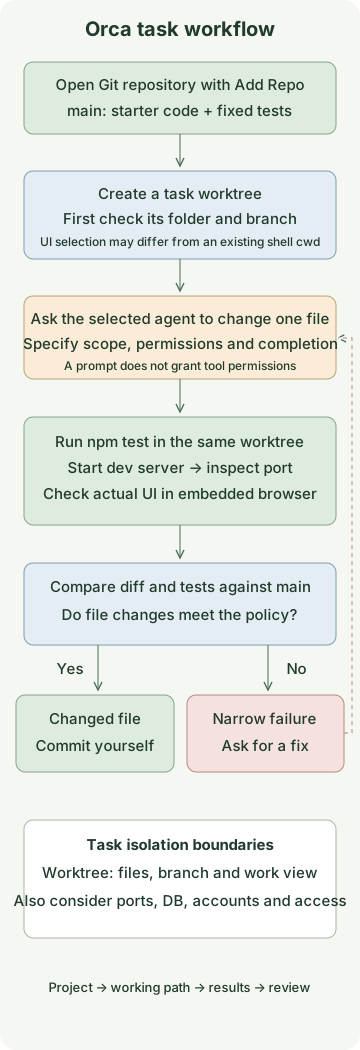
Use an illustrative shipping-fee policy: orders of 50,000 won or more ship free; orders below that cost 3,000 won, and only nonnegative safe integers are accepted. This is not a real service’s policy. Save the following four files in a new orca-shipping-example folder. No external npm package is needed.
package.json
{
  "name": "orca-shipping-example",
  "private": true,
  "type": "module",
  "engines": { "node": ">=24" },
  "scripts": { "test": "node --test shipping.test.mjs" }
}
shipping.mjs
export function shippingFee(orderTotal) {
  return orderTotal > 50_000 ? 0 : 3000;
}
shipping.test.mjs
import test from 'node:test';
import assert from 'node:assert/strict';
import { shippingFee } from './shipping.mjs';

for (const [total, expected] of [[0, 3000], [49_999, 3000], [50_000, 0], [50_001, 0]]) {
  test(`shippingFee(${total}) = ${expected}`, () => {
    assert.equal(shippingFee(total), expected);
  });
}
for (const [label, total] of [
  ['negative', -1],
  ['fraction', 50_000.5],
  ['string', '50000'],
  ['NaN', Number.NaN],
  ['Infinity', Number.POSITIVE_INFINITY],
  ['unsafe integer', Number.MAX_SAFE_INTEGER + 1],
]) {
  test(`rejects ${label}`, () => {
    assert.throws(() => shippingFee(total), RangeError);
  });
}
index.html
<!doctype html>
<html lang="ko">
<meta charset="utf-8">
<meta name="viewport" content="width=device-width, initial-scale=1">
<title>Orca 배송비 예제</title>
<h1>배송비 경계값 확인</h1>
<pre id="result"></pre>
<script type="module">
  import { shippingFee } from './shipping.mjs';
  const totals = [49_999, 50_000, 50_001];
  document.querySelector('#result').textContent = totals
    .map(total => `${total}원 → 배송비 ${shippingFee(total)}원`)
    .join('\n');
</script>
</html>
Run the following in the example folder with Git author configuration already prepared.
git init -b main
git add package.json shipping.mjs shipping.test.mjs index.html
git commit -m "Add shipping exercise"
npm test
The starter incorrectly handles the 50,000 boundary and does not reject invalid inputs. An actual run confirmed 3 passing and 7 failing tests out of 10. Recording this state as the base commit lets you compare later whether the tests or configuration changed too.
Request a change from an agent in a worktree
Open the example repository with Orca’s Add Repo, then check the CLI in a terminal connected to that repository. If the CLI is unavailable, install it through Settings → General → Orca CLI as described in the official CLI guide. These commands assume the macOS orca executable.
orca skills get orca-cli
orca worktree current --json
When separating the work, create a new worktree from the current project’s main.
orca worktree create --name shipping-fee-fix \
  --parent-worktree active --base-branch main \
  --setup skip --activate --json
--parent-worktree active records the Orca work relationship; --base-branch main sets the Git starting point. These are different settings. This example skips setup because there are no external dependencies to install. Follow the appropriate setup policy in a real project. Because this command has no --agent, it does not request an agent task.
Open a terminal in the new workspace and check it. Distinguish the shell that ran the original command from the shell in the new worktree.
git rev-parse --show-toplevel
git branch --show-current
orca worktree current --json
Branch names may vary with Orca prefix settings and other configuration. After checking that the worktree in the JSON and the Git path and branch are the intended workspace, open a prepared agent tab and send the following prompt. Available agents and chat/CLI execution depend on the environment’s configuration.
First check the current working directory and branch, and read shipping.mjs and shipping.test.mjs.
Fix the illustrative shipping-fee policy to satisfy this contract:

- Orders of 50,000 won or more have a shipping fee of 0; below that it is 3,000 won.
- Accept only nonnegative safe integers as order totals; all other inputs raise RangeError.
- Modify only shipping.mjs; do not change the tests, package.json or index.html.
- Do not install dependencies, call external networks, commit, push or create a PR.

Report the actual result of running npm test and the reason for the change.
State explicitly if you could not run a check.
Even when Orca groups work together, actual tool permissions depend on the agent and execution environment. Prompt restrictions alone do not enforce the access boundary. This guide assumes neither specific permission button names nor identical behavior across all providers.
Check tests and the browser in the same workspace
Run npm test in the embedded terminal. For automation, you can create a test terminal in the current worktree:
orca terminal create --title "tests" --command "npm test" --jsonIn automation, use the returned terminal handle as the target of later commands. terminal read --screen reads the current screen; plain terminal read reads accumulated output. An accepted input and the actual start of a command or agent task are different events. This guide verified all 10 tests passing and only shipping.mjs changed in the output of a test terminal created for this purpose. This was checked by directly inserting the reference solution; it is not a record of an AI task execution.
To check the browser, start the server in a terminal in the same worktree. This assumes port 4877 is available.
python3 -m http.server 4877 --bind 127.0.0.1Check the port in another terminal.
orca ports --json
orca tab create --url http://127.0.0.1:4877/ --json
If the server uses another port, use the port from the listing and its corresponding URL. Not everything shown by orca ports is an HTTP web page. Connect according to the embedded browser guide and check the following values on the example page:
49999원 → 배송비 3000원
50000원 → 배송비 0원
50001원 → 배송비 0원
The three lines above were checked in the actual Orca browser using the example with the reference solution. Stop the server with Ctrl+C in its terminal after checking. Do not close unrelated terminals in bulk merely because the task is finished; distinguish the task’s process and tabs.
Review the diff and record only the changed file
Check the base ref and changed files in the Orca diff viewer. Changed-line comments let you point an agent to a location. For example: “50,000 won should also be free. Keep the test expectations and check the comparison operator.”
Compare with the base main in the terminal as well.
git status --short
git diff main --name-only
git diff main -- shipping.mjs
git diff --exit-code main -- shipping.test.mjs package.json index.html
npm test
Only shipping.mjs should be changed in this task. If tests, configuration or the page changed, first determine why. New files can be omitted from an ordinary diff, so check Git status as well. Run any checks the agent could not execute yourself; do not treat an answer of “done” as a passing result.
The following is the directly verified reference solution. Compare it with the agent’s proposed code after the exercise. To run it, put this code in shipping.mjs at the project root.
reference/shipping.mjs
export function shippingFee(orderTotal) {
  if (!Number.isSafeInteger(orderTotal) || orderTotal < 0) {
    throw new RangeError('orderTotal must be a nonnegative safe integer');
  }
  return orderTotal >= 50_000 ? 0 : 3000;
}
With the reference solution, all 10 of the same tests passed and the original test, configuration and HTML were preserved. After checking the conditions, commit only the files needed on the task branch.
git add shipping.mjs
git commit -m "Fix free-shipping boundary and input validation"
A commit and merging to the base branch are separate steps. If another task changes main, check the diff and tests again before merging. A worktree separates source workspaces, but it is not a security sandbox. Different worktrees can still share execution resources such as databases, ports, accounts and secrets.
Initially, practicing this flow on one task makes problems easier to locate than immediately adding several agents. Expand to parallel work when file or feature boundaries and completion conditions are distinct.
Discussion