Deploying a notes app with Cloudflare Workers and Neon
Cloudflare Pages serves the static interface. A Pages Function running on Workers handles /api/notes. Because the page and API share an origin, the browser can read the list without extra CORS configuration. Neon PostgreSQL stores the notes. Pages Functions
Anyone can read the list. Writing requires a token, so use this example only for practice notes. The responses below are what to expect after deployment.
Create the notes table and API
In the SQL Editor for a practice Neon database, create the notes table.
CREATE TABLE notes (
  id integer GENERATED ALWAYS AS IDENTITY PRIMARY KEY,
  body text NOT NULL CHECK (char_length(body) BETWEEN 1 AND 200)
);
With Node.js and npm installed, run these commands from the project root.
npm init -y
npm install @neondatabase/serverless
npm install --save-dev wrangler
mkdir -p functions/api public
Save the handler in functions/api/notes.js at the project root. The Neon driver’s tagged template passes the note body as a SQL parameter. Pages Functions · Neon
import { neon } from "@neondatabase/serverless";

export async function onRequest({ request, env }) {
  const reply = (data, status = 200) =>
    Response.json(data, {
      status,
      headers: { "Cache-Control": "no-store" },
    });

  if (request.method === "POST") {
    if (
      !env.DEMO_WRITE_TOKEN ||
      request.headers.get("Authorization") !== `Bearer ${env.DEMO_WRITE_TOKEN}`
    ) {
      return reply({ error: "Unauthorized" }, 401);
    }

    const input = await request.json().catch(() => null);
    const body = typeof input?.body === "string" ? input.body.trim() : "";

    if (!body || Array.from(body).length > 200) {
      return reply({ error: "Enter a note of 1 to 200 characters" }, 400);
    }

    const sql = neon(env.DATABASE_URL);
    const [note] = await sql`
      INSERT INTO notes (body) VALUES (${body}) RETURNING id, body
    `;
    return reply(note, 201);
  }

  if (request.method === "GET") {
    const sql = neon(env.DATABASE_URL);
    const notes = await sql`
      SELECT id, body FROM notes ORDER BY id DESC LIMIT 20
    `;
    return reply(notes);
  }

  return new Response(null, {
    status: 405,
    headers: { Allow: "GET, POST" },
  });
}
In public/index.html, fetch the list and display each note’s body using textContent.
<!doctype html>
<html lang="en">
<meta charset="utf-8">
<title>Notes</title>
<h1>Notes</h1>
<pre id="notes">Loading…</pre>
<script type="module">
  const output = document.querySelector("#notes");
  try {
    const response = await fetch("/api/notes");
    if (!response.ok) throw new Error();
    const notes = await response.json();
    output.textContent = notes.map((note) => note.body).join("\n") || "No notes";
  } catch {
    output.textContent = "Could not load notes.";
  }
</script>
</html>
Read the same note after a redeploy
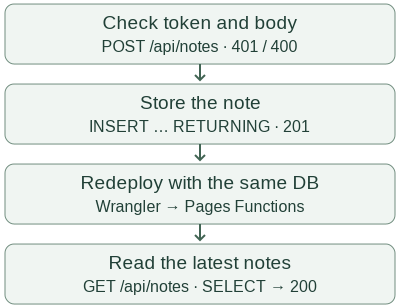
Log in to Wrangler and create a Pages Direct Upload project. Replace the example project name with your own. This example sets the production branch to main.
PROJECT_NAME="my-neon-notes"
npx wrangler login
npx wrangler pages project create "$PROJECT_NAME" --production-branch main
In the Pages project’s Production environment, save the Neon connection string as the DATABASE_URL secret and a long, randomly generated token as DEMO_WRITE_TOKEN. Deploy from the project root so Wrangler builds the Functions alongside the static site. Deployments to other branches use Preview secrets. Direct Upload · Pages Secrets
npx wrangler pages deploy public --project-name "$PROJECT_NAME" --branch mainIn your shell, set BASE_URL to the project’s production URL and DEMO_WRITE_TOKEN to the same write token. Send the following requests.
curl -i "$BASE_URL/api/notes" \
  -H "Authorization: Bearer $DEMO_WRITE_TOKEN" \
  -H "Content-Type: application/json" \
  --data '{"body":"Keep this note after redeployment"}'

curl -i "$BASE_URL/api/notes"
Look for 201 and the note ID in the write response. Redeploy to the same project and production branch with the same database, then repeat the read request. A 200 response containing the same ID and body shows the new API can read the saved note. Check that the browser displays it and that writing without a token returns 401.
Discussion