Jenkins Home Backup: Restore a Stopped Controller into a New Volume
Verify a backup by restoring it into a new volume and starting Jenkins from that volume. An archive file’s existence alone does not establish that the controller can use it.
This lab stops a fresh, otherwise unused controller before copying its home. It stores master.key separately from the archive, then restores the private archive into another newly created volume, starts the same image digest, and checks a marker and the original initial password without printing either password value. It does not exercise a production controller, an active job or a plugin migration.
Stop, copy, restore and start
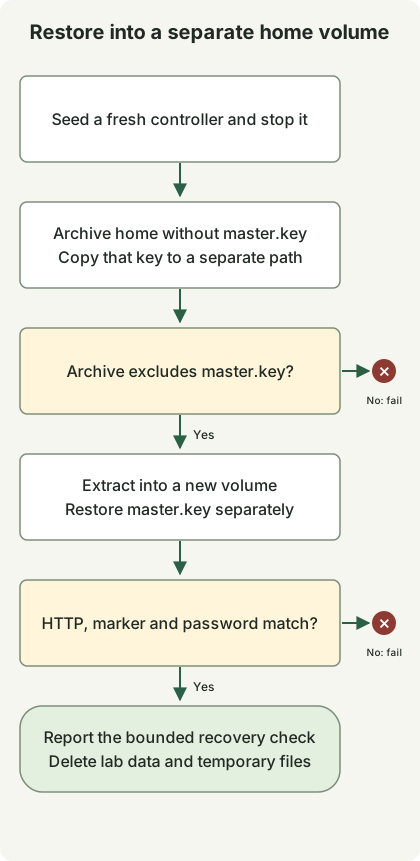
The Jenkins backup guide distinguishes backup contents from recovery validation. This example uses a stopped source to avoid copying while this controller writes files. It is not a coordinated snapshot of external databases, agents or other writers.
Use the complete jenkins_lab.py from the controller recreation lab, then save this second file alongside it. Python3 and a running Linux-container Docker engine are required.
jenkins_restore.py
import json
import tempfile
from jenkins_lab import DockerLab

with DockerLab() as lab, \
        tempfile.TemporaryDirectory(prefix='jenkins-private-backup-') as backup, \
        tempfile.TemporaryDirectory(prefix='jenkins-private-key-') as keys:
    original = lab.start()
    password = lab.password(original)
    assert password, 'Missing initial password'
    lab.cli('exec', original, 'sh', '-c', 'printf restored > /var/jenkins_home/lab-marker')
    lab.cli('stop', '-t', '30', original)
    lab.cli('run', '--rm', '--user', '0:0', '--entrypoint', 'sh',
            '--mount', f'type=volume,source={lab.home},target=/source,readonly',
            '--mount', f'type=bind,source={backup},target=/backup',
            '--mount', f'type=bind,source={keys},target=/keys', lab.image,
            '-c', 'set -e; umask 077; tar -C /source --exclude=./secrets/master.key -czpf /backup/home.tgz .; cp -p /source/secrets/master.key /keys/master.key')
    members = lab.cli('run', '--rm', '--user', '0:0', '--entrypoint', 'tar',
                      '--mount', f'type=bind,source={backup},target=/backup,readonly', lab.image,
                      '-tzf', '/backup/home.tgz')
    assert './secrets/master.key' not in members.splitlines()
    restored_home = lab.volume()
    lab.cli('run', '--rm', '--user', '0:0', '--entrypoint', 'tar',
            '--mount', f'type=bind,source={backup},target=/backup,readonly',
            '--mount', f'type=volume,source={restored_home},target=/restore', lab.image,
            '-xzpf', '/backup/home.tgz', '-C', '/restore')
    lab.cli('run', '--rm', '--user', '0:0', '--entrypoint', 'cp',
            '--mount', f'type=bind,source={keys},target=/keys,readonly',
            '--mount', f'type=volume,source={restored_home},target=/restore', lab.image,
            '-p', '/keys/master.key', '/restore/secrets/master.key')
    restored = lab.start(restored_home)
    assert lab.marker(restored) == 'restored'
    assert lab.password(restored) == password
    print(json.dumps({'image': lab.image, 'jenkins': lab.version, 'sourceStopped': True,
                      'restoredToNewVolume': True, 'masterKeyExcluded': True, 'keyCopiedSeparately': True, 'markerRestored': True,
                      'passwordRestored': True, 'result': 'passed'}))
Run:
python3 jenkins_restore.pyThe helper containers override the entrypoint with file-copy tools, so they do not start another Jenkins process. They run as root only for preserving the source ownership and permissions during this copy. The archive member list must exclude master.key, and a separate helper restores that key before Jenkins starts. The source volume is mounted read-only after its controller stops; the restore destination is a different volume created by this lab. The image digest is the one selected when entering the lab.
A successful result has sourceStopped, restoredToNewVolume, markerRestored, passwordRestored, masterKeyExcluded, keyCopiedSeparately and result: passed. The started restoration must also satisfy the HTTP readiness check from DockerLab.start. Matching the initial password checks that this selected secret survived; it is not a test of completed user administration or every credentials plugin.
Treat the archive as controller data
This is a disposable recovery exercise. The archive excludes secrets/master.key; that key is copied separately and applied after archive extraction. Other controller secrets remain in the archive. Both temporary directories are private and removed on exit. Do not upload that archive as a CI artifact, commit it or use this all-in-one copy as a production backup policy.
For production, the Jenkins guidance on the controller key requires handling master.key separately from regular backups. Decide key recovery, archive encryption, retention, access, off-host storage and the treatment of external state before adopting a backup process. The lab’s temporary same-machine archive has none of those durability guarantees.
The restored controller is also removed when the lab finishes. That cleanup makes repeated exercises possible, but a passed marker/secret/HTTP check does not establish that every job, plugin, credential or external integration can recover. Add representative workload and secret-decryption checks to a planned recovery rehearsal for the actual system.
Discussion