Jenkins in Docker: Verify Startup and Container Recreation
Start Jenkins with a named home volume, verify its HTTP endpoint, then recreate the container against the same volume. Reaching a setup screen proves the controller started; a second start checks whether its home data survives container replacement.
A rolling tag can point to a different image later. Resolve the image once for the experiment and keep the generated initial password private. The disposable lab reports comparisons without printing the password.
Fix the image for one experiment
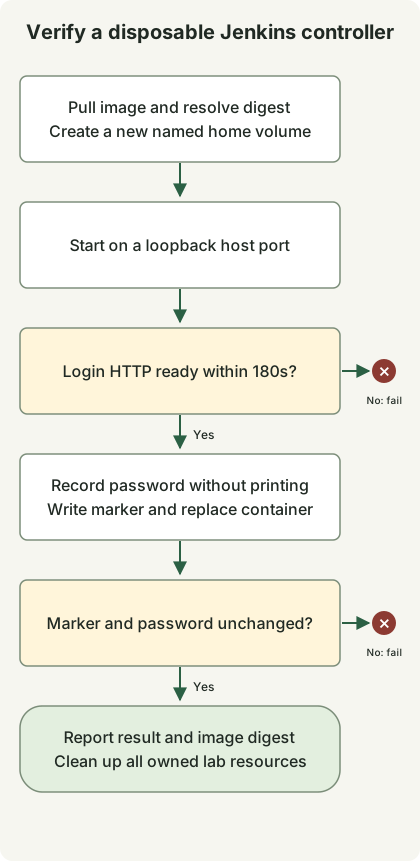
Use Python3 and a Docker engine running Linux containers. The Jenkins image instructions describe jenkins/jenkins and its home directory. This lab starts from jenkins/jenkins:lts-jdk21, pulls it and resolves its repository digest. Every controller in that run uses the digest rather than looking up the rolling tag again. Record the digest and returned Jenkins version when reproducing a run; the tag does not specify a permanent release.
Docker’s published-port behavior determines who can reach a mapped port. The script requests 127.0.0.1::8080 so Docker chooses a host port bound to loopback, then checks the reported binding. It neither publishes an agent port nor mounts the Docker socket. This is a local controller lab, not an installation of Docker build agents or a remote HTTPS service.
Run the complete lab
Save this complete file as jenkins_lab.py. It creates its own uniquely named volume and containers. The context manager removes those lab resources when the test finishes, including on a failed readiness or data check. Do not substitute a production volume into this disposable example.
jenkins_lab.py
import http.client
import json
import os
import subprocess
import time
import urllib.error
import urllib.request
import uuid


class DockerLab:
    def __init__(self):
        self.prefix = 'jenkins-proof-' + uuid.uuid4().hex[:12]
        self.containers, self.volumes = [], []

    def cli(self, *args):
        return subprocess.check_output(['docker', *args], text=True, stderr=subprocess.PIPE).strip()

    def volume(self):
        name = f'{self.prefix}-home-{len(self.volumes)}'
        existing = subprocess.run(['docker', 'volume', 'inspect', name], capture_output=True)
        if existing.returncode == 0:
            raise RuntimeError('Refusing an existing volume')
        self.cli('volume', 'create', name)
        self.volumes.append(name)
        return name

    def __enter__(self):
        self.cli('info')
        requested = os.environ.get('JENKINS_IMAGE', 'jenkins/jenkins:lts-jdk21')
        self.cli('pull', requested)
        self.image = self.cli('image', 'inspect', requested, '--format', '{{index .RepoDigests 0}}')
        if '@sha256:' not in self.image:
            raise RuntimeError('Expected a pulled repository digest')
        self.home = self.volume()
        return self

    def start(self, volume=None):
        name = f'{self.prefix}-controller-{len(self.containers)}'
        self.cli('run', '-d', '--name', name, '-p', '127.0.0.1::8080',
                 '--mount', f'type=volume,source={volume or self.home},target=/var/jenkins_home', self.image)
        self.containers.append(name)
        port = self.cli('port', name, '8080/tcp')
        if not port.startswith('127.0.0.1:'):
            raise RuntimeError('Expected a loopback binding')
        deadline = time.monotonic() + 180
        while time.monotonic() < deadline:
            try:
                with urllib.request.urlopen(f'http://{port}/login', timeout=5) as response:
                    self.version = response.headers.get('X-Jenkins')
                    if response.status == 200 and self.version and b'Jenkins' in response.read():
                        return name
            except (urllib.error.URLError, TimeoutError, ConnectionError, http.client.HTTPException):
                pass
            time.sleep(2)
        raise RuntimeError('Jenkins login was not ready within 180 seconds')

    def password(self, name):
        return self.cli('exec', name, 'cat', '/var/jenkins_home/secrets/initialAdminPassword')

    def marker(self, name):
        return self.cli('exec', name, 'cat', '/var/jenkins_home/lab-marker')

    def __exit__(self, *_):
        for name in reversed(self.containers):
            subprocess.run(['docker', 'rm', '-f', name], capture_output=True)
        for name in reversed(self.volumes):
            subprocess.run(['docker', 'volume', 'rm', name], capture_output=True)


if __name__ == '__main__':
    with DockerLab() as lab:
        first = lab.start()
        password = lab.password(first)
        assert password, 'Missing initial password'
        lab.cli('exec', first, 'sh', '-c', 'printf kept > /var/jenkins_home/lab-marker')
        lab.cli('rm', '-f', first)
        second = lab.start()
        assert lab.marker(second) == 'kept'
        assert lab.password(second) == password
        print(json.dumps({'image': lab.image, 'jenkins': lab.version, 'recreated': True,
                          'markerPersisted': True, 'passwordPersisted': True, 'result': 'passed'}))
Run with a working Docker daemon:
python3 jenkins_lab.pyThe two controller starts each wait up to 180 seconds for HTTP200 on /login, an X-Jenkins header and a body containing Jenkins. Connection resets, temporary HTTP failures and incomplete HTTP handshakes are retried within that deadline. The test writes a marker and reads the initial password privately, replaces the first container, then checks both values again. A result with recreated, markerPersisted, passwordPersisted and result: passed means these selected checks passed. The JSON also records the digest and actual Jenkins version, so an invented pull transcript is unnecessary.
The lab does not unlock Jenkins, install plugins, create a completed administrator account or run a job. Its readiness check concerns the login HTTP response, not successful onboarding. On a Mac without a running Docker engine, start your chosen engine before running it; a Docker CLI alone cannot execute the lab.
Keep installation and persistence separate
For an interactive installation, follow the official setup wizard and create an administrator account. Read the initial password from your own controller’s /var/jenkins_home/secrets/initialAdminPassword; do not reuse an example value or publish controller logs containing it. This script deliberately cleans up its lab, so it is not the command to retain an interactive installation.
A named Docker volume can survive deleting a container, but it is not a backup: losing the volume still loses its data. The stopped-volume backup and restore lab continues with the same image and a different destination volume. For this blog’s own publication pipeline, see the Astro Draft PR workflow; this Jenkins example does not replace that pipeline.
Discussion