Kafka event streaming: partitions, consumer groups, offsets, and reprocessing
On this page
Kafka event streaming keeps records of facts in a log and lets multiple consumers read and process them from their own positions. Shipping preparation and analytics can independently read order events, and stored records can be reprocessed with new logic. However, storing an event in Kafka and changing an external DB or payment exactly once are separate matters.
This article is for developers familiar with HTTP APIs and databases. It connects topics, partitions, and consumer groups, then runs event publication, independent consumption, and replay in local Kafka. It focuses on consumer positions and the meaning of reprocessing after failure, rather than implementing aggregations, windows, or joins in Kafka Streams.
How does event streaming differ from a work queue?
An event is a fact that has already occurred, such as “an order was created.” Distinguishing it from a command requesting a specific action, such as “start shipping,” lets multiple consumers use the same record for their own business tasks. Kafka can also divide work within a group like a queue, but consuming a record does not immediately delete it. Other groups and replay jobs can read it again within the retention policy. Introduction to Apache Kafka
| Concept | Role | What to decide during design |
|---|---|---|
| Producer | Writes events to Kafka | Keys, event IDs, schemas, publication-failure handling |
| Topic | Logical stream of related events | Event meaning, retention and compaction policies, access permissions |
| Partition | Division of an ordered log | Scope of ordering, key distribution, parallel throughput |
| Consumer group | Set of consumers sharing the same business task | Group ID, processing and commit timing, reprocessing policy |
| Offset | Record position within a partition | How far it has been read and where to resume |
For example, if the shipping-v1 and analytics-v1 groups read the orders.v1 topic, both business tasks can receive the same events independently. If shipping and analytics consumers are instead placed in the same group, they split the records, so neither task is configured to receive every event.
With ordinary group subscriptions, a partition is assigned to one consumer within a group. Five consumers in a group reading 3 partitions do not all receive partitions. Assignments are independent in other groups. This article uses ordinary KafkaConsumer group subscriptions, distinct from record-level shared consumption models. KafkaConsumer group subscriptions
Start with the key when ordering matters
Kafka defines record order within a partition. If the sequence of state changes for one order matters, start by using the order ID as the key to route them to the same partition. A key determines routing; an event ID identifies duplicates. They serve different purposes. If multiple events from the same order have the same event ID, legitimate subsequent events can also be discarded as duplicates.
Routing for the same key also requires consistent key serialization, partitioning, and partition count. Increasing the partition count can change where subsequent records go, so review their ordering relative to earlier records. Unbounded parallel execution after reading from one partition also changes completion order. Kafka log order does not always match the business occurrence-time order either. Handling late events from multiple publishers requires business versions, occurrence times, and rules for out-of-order processing.
A hot key, such as one customer accounting for most events, can concentrate load in one partition. Rather than arbitrarily splitting an ordering unit into smaller keys, examine the required ordering scope alongside processing cost.
Local run: two groups read the same records, then replay them
The following example uses tools included in Apache’s apache/kafka:4.1.2 image. It requires Bash and running Docker; the first run needs to download the image. The broker and CLI run in the same container, so no host port is exposed. Exercise data is removed when the container stops. This functional demonstration uses 1 broker, 1 partition, and a replication factor of 1. Official Docker instructions
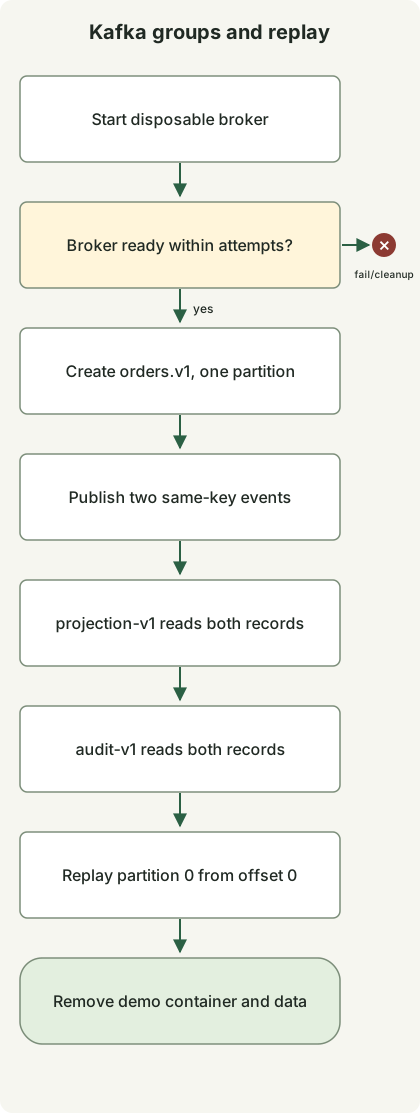
The diagram shows the script’s successful execution order. It stops on readiness or command failure and cleans up the exercise container on exit if creation succeeded. The two group reads and one direct replay run sequentially. External DB processing and manual offset commits are not implemented.
Save this as kafka-demo.sh and run bash kafka-demo.sh.
#!/usr/bin/env bash
set -euo pipefail

kafka_image=apache/kafka:4.1.2
kafka_name="kafka-stream-demo-$$-$RANDOM"
docker run -d --name "$kafka_name" "$kafka_image" >/dev/null
trap 'docker rm -f "$kafka_name" >/dev/null 2>&1 || true' EXIT

ready=false
for ((attempt=0; attempt<30; attempt++)); do
  if docker exec "$kafka_name" /opt/kafka/bin/kafka-topics.sh \
      --bootstrap-server localhost:9092 --list >/dev/null 2>&1; then
    ready=true
    break
  fi
  sleep 1
done
if [ "$ready" != true ]; then
  docker logs "$kafka_name" >&2
  exit 1
fi

docker exec "$kafka_name" /opt/kafka/bin/kafka-topics.sh \
  --bootstrap-server localhost:9092 --create --topic orders.v1 \
  --partitions 1 --replication-factor 1 >/dev/null

docker exec -i "$kafka_name" /opt/kafka/bin/kafka-console-producer.sh \
  --bootstrap-server localhost:9092 --topic orders.v1 \
  --producer-property acks=all --producer-property enable.idempotence=true \
  --property parse.key=true --property key.separator=: <<'EVENTS'
order-101:{"eventId":"evt-1","type":"OrderCreated","schemaVersion":1}
order-101:{"eventId":"evt-2","type":"PaymentConfirmed","schemaVersion":1}
EVENTS

for group in projection-v1 audit-v1; do
  printf 'group=%s\n' "$group"
  docker exec "$kafka_name" /opt/kafka/bin/kafka-console-consumer.sh \
    --bootstrap-server localhost:9092 --topic orders.v1 --group "$group" \
    --from-beginning --max-messages 2 --timeout-ms 15000 \
    --property print.key=true --property 'key.separator=|'
done

printf 'replay=partition-0-offset-0\n'
docker exec "$kafka_name" /opt/kafka/bin/kafka-console-consumer.sh \
  --bootstrap-server localhost:9092 --topic orders.v1 \
  --partition 0 --offset 0 --max-messages 2 --timeout-ms 15000 \
  --property print.key=true --property 'key.separator=|'
This is the standard output verified with Docker Engine 24.0.5 and apache/kafka:4.1.2. Each consumer command also writes Processed a total of 2 messages separately to standard error.
group=projection-v1
order-101|{"eventId":"evt-1","type":"OrderCreated","schemaVersion":1}
order-101|{"eventId":"evt-2","type":"PaymentConfirmed","schemaVersion":1}
group=audit-v1
order-101|{"eventId":"evt-1","type":"OrderCreated","schemaVersion":1}
order-101|{"eventId":"evt-2","type":"PaymentConfirmed","schemaVersion":1}
replay=partition-0-offset-0
order-101|{"eventId":"evt-1","type":"OrderCreated","schemaVersion":1}
order-101|{"eventId":"evt-2","type":"PaymentConfirmed","schemaVersion":1}
Each group read both events, and the final direct replay read the same two records. This verifies that consumption by one group does not prevent another group’s reads or log replay. With only one partition, it does not verify ordering across partitions or parallel assignment within a group.
The example checks console-tool consumption using the default auto-commit setting. It neither implements an application that manually commits after business processing nor tests failures between processing and commits. Input JSON schema validation, external DB or payment updates, and processing during rebalances are also not implemented.
Does committing an offset guarantee business completion?
It does not. A consumer’s current position can advance as poll() receives records, but the committed position used after restart is separate. In sequential processing, after completing offset 10, you usually commit 11, the next position to read. With multiple partitions, manage completion ranges for each partition. Offsets do not necessarily represent a continuous sequence of integer-numbered records, because of deletion, transactions, and other factors. KafkaConsumer positions and commits
| Execution order and failure point | Possible result after restart | Required handling |
|---|---|---|
| Commit offset → terminate before DB change | Business update omitted because that change is skipped | Change commit ordering to match the required delivery semantics |
| Complete DB change → terminate before offset commit | Redelivery and reprocessing of the same event | Idempotent processing or deduplication |
| Commit a later position after some records fail | Failed records may be skipped | Commit only the contiguous successfully processed range |
| Reassign a partition to another consumer | Existing work may overlap work by the new owner | Stop work by the former owner and prevent duplicate external effects |
A consumer updating an external DB can, for example, check uniqueness of (처리기 ID, eventId) and apply the actual business change in the same DB transaction. Saving only the processed marker first and then failing the actual change can cause the next delivery to be mistaken for a duplicate. Saving the marker separately after the change can instead cause a duplicate change if failure occurs in between. Calls to other external APIs are not automatically included in this DB transaction, so those APIs also need idempotency keys and result verification.
The producer’s enable.idempotence addresses duplicate log records caused by producer retries; it does not remove every situation in which an application publishes the same business event twice as new publications. acks=all is not a guarantee against data loss regardless of other settings either. Examine the replication factor, min.insync.replicas, and actual ISR state together. The single-broker exercise above does not verify tolerance of broker loss. Producer configuration
Distinguish processing that uses Kafka transactions to combine input offsets with output-topic records and consumes with read_committed from applying external DB or payment effects exactly once. Without cooperation from external systems, using Kafka does not make everything exactly-once. Kafka delivery semantics and transactions
Design retries and replay as normal operational paths
For temporary external failures, limit retries by count, total time, and concurrency. If one persistently failing event blocks the entire partition, consider a deferred-processing path, but check whether advancing later events in the original flow breaks business ordering. Sending a failed event to a separate DLQ topic does not complete the business task. Retain the original event ID, failure reason, schema version, reprocessing owner, and resolution deadline, and handle failures between writing the DLQ record and advancing the input offset.
A producer that commits to the DB and publishes to Kafka separately can also fail between those actions. Saving the DB change and an outbox record in the same transaction, then delivering it, is one response; consumers must still handle duplicate delivery. Adding Kafka does not put the source DB and log into one transaction. Transactional outbox pattern
--from-beginning does not unconditionally rewind a group with a valid committed position. The exercise uses new groups, and the final step specifies the partition and starting offset directly instead of resetting a group. Operational replay that changes an existing group’s position needs a separate procedure: stop consumers and verify the target, range, and external effects first. Even replay with a new group can trigger payments or notifications again, so output isolation or an idempotency policy is required. Consumer offset-reset configuration
If processing falls behind the retention period, required records may already have been deleted. Log compaction also does not preserve every historical state for a key. Define the replayable range together with retention and compaction policies and the ability to interpret the required schemas.
For initial adoption, choose one business flow and check not only normal processing, but termination after the DB update and before commit, restarts, rebalances, invalid schemas, delayed external dependencies, and duplicate effects during replay. lag is the difference between a chosen end position and a consumer or committed position, so specify which positions the metric uses. Alongside lag, observe the delay from event occurrence to business update, processing failures, retries, DLQ, rebalances, broker storage, and replication state to distinguish “reading records” from “completing the business task.”
Discussion