How Pickle AI works: iPhone app control and password protection boundaries
On this page
Pickle AI’s official explanations point to a separate browser and connected accounts carrying out work, rather than directly operating other app screens on an iPhone. Passwords are encrypted separately from the model, but the protection boundary for values actually used to log in differs between OAuth and website passwords.
The subject is Pickle, a personal AI agent from Pickle, Inc. This analysis uses official help pages accessed on November 13, 2026 and the public credential-enclave source at commit cff16a343bf5bb7953e5b65df6ab3600107e127d. I ran release verification for the public security program; this is not an audit of the installed iOS app or the entire production server.
Does it actually tap other iPhone apps?
The saved-login help page says Pickle’s browser is separate from the phone and cannot directly use logins stored on the phone. The task delegation guide also describes operating websites in a real browser and continuing work after the app is closed.
A completed order or reservation alone therefore does not establish that an installed shopping app’s screen was tapped. The paths supported by the public material are:
| Path | Evidence and meaning |
|---|---|
| Separate browser | Logs in to websites and fills forms, separately from the phone’s app screens |
| Connected-account API | The public forward code attaches credentials to allowed provider API requests |
| Phone call | The official task guide describes calling on the user’s behalf for things that cannot be done on the web |
Apple’s explanation of third-party app sandboxing also restricts access to other information to services provided by iOS. This alone does not rule out all automation, but I found no evidence that Pickle bypasses the sandbox to control other apps.
The available material does not establish which DOM tools or screen-recognition models Pickle’s browser uses, or which execution path is chosen for every task. The operating model here is an analysis connecting official guidance and the public credential path.
How can it log in without giving the password to the AI?
Even if a model never outputs the password string directly, a separate executor can receive the necessary value and put it into a login form. Pickle’s privacy explanation says password and card values are encrypted on the device and hidden from results received by the model. The technical boundaries of this explanation need to be compared with public code.
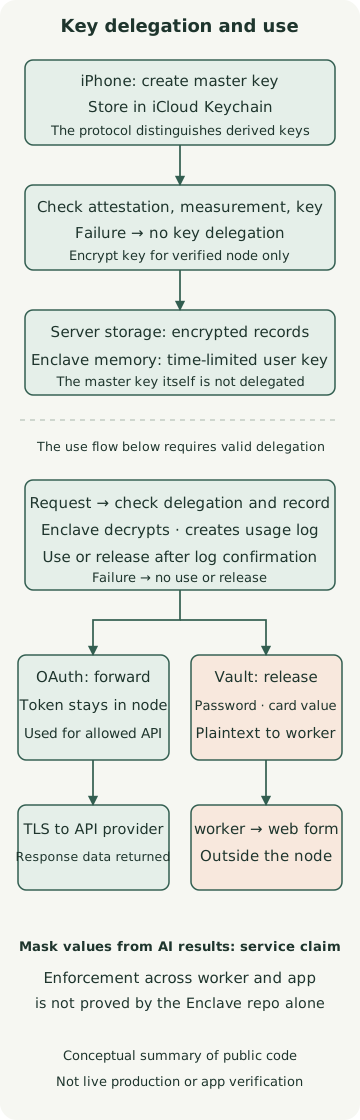
The top of the diagram shows setup, where a key is delegated in advance; the lower part shows credential use while the delegation remains valid. It does not mean the phone must send a new key at every login. Nor does the diagram reproduce every implementation detail of the task executor.
Device keys and encrypted records
The public protocol specifies that a master key created on the device is held in iCloud Keychain, with separate derived keys for signing, log decryption and credentials. Stored records are encrypted with ChaCha20-Poly1305, with context such as account and record type also bound to authentication.
The device verifies the node’s attestation and public key, then encrypts and delegates the derived user key to that node. Remote attestation checks which measured execution environment a public key belongs to. AWS Nitro Enclaves isolate memory from the parent server and do not provide direct external networking or persistent storage. A Pickle node uses communications relayed by the host; that fact does not grant the host permission to decrypt.
The delegated user key is used in node memory for a limited period. The public architecture description specifies a maximum delegation of 30 days. The device Keychain and the server’s Nitro Enclave are different layers of protection.
OAuth tokens are used inside the node
The API forwarding code checks for an active delegation, opens the OAuth record and prepares an allowed provider request. It executes the request after confirming that the usage record was saved. This path makes an authenticated request instead of handing the token to the model.
However, hiding a token and hiding data read with that token are different things. The egress policy separately covers returning provider responses to the operational environment. If permission to read email is granted, the model may process the email contents; that must be evaluated separately from token protection.
Website passwords cross a different boundary after release
The Vault code defines types that select passwords, card values and TOTP codes for an egress response. The actual release handler serializes and returns the values after confirming the usage record was saved. At that point passwords and card values leave the node as plaintext usable by the operational worker. For TOTP, the calculated one-time code leaves rather than the seed.
The public code’s origin check only validates the format of an HTTPS origin. A comment states that the caller is responsible for deciding whether the address matches the saved login site. The Enclave code alone therefore cannot establish site restrictions or masking of model results.
This is not evidence of an actual leak. However, hiding a value from model input, encrypted storage, and plaintext use in worker memory are distinct security properties. The statement that “the AI does not receive the password” must not be expanded into “a decrypted password never leaves the protected area.”
What does the usage record guarantee?
The official usage-history guide says the record is saved first and credentials are not used if saving fails. Public API code also shows use or release occurring after confirmation of log persistence. Encrypted records, signatures and links are intended to make changes or omissions detectable.
A record does not guarantee that the user intended the task or that it succeeded on the external site. For example, the actual request may fail after the record is saved. Approval before payment and reconfirming the amount are execution policies in the official service description, not properties that follow automatically from credential encryption.
If the TOTP seed is delegated too, the agent can generate codes. This is a convenience feature in the saved-login guide, but it differs from the user separately approving a second authentication factor for each task. The delegation scope should be judged more broadly than when delegating only a password.
Verify the public security program’s proof
The secure-program documentation also publishes the device-side security program and provides a tool to verify the release signature and transparency-log proof. The example below checks whether a public file matches its release proof. It does not connect to a production node or use a real password.
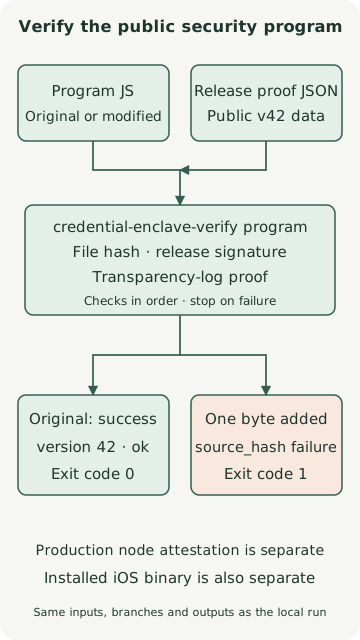
Git, curl, Rustup and native build tools are required, and downloading source and Rust dependencies uses the network. The verifier was built from the pinned commit below on macOS arm64 with Rust 1.100.0. The repository pins tool version 1.98.1; here +1.100.0 explicitly selects the execution version.
verify-example.sh
# macOS·Linux 셸, Git·curl·Rustup 및 네이티브 빌드 도구가 필요합니다.
# 새 작업 폴더에서 실행합니다. 아래 검증은 계정 로그인이나 실제 비밀번호를 사용하지 않습니다.
git clone https://github.com/pickle-com/credential-enclave.git
cd credential-enclave
git checkout cff16a343bf5bb7953e5b65df6ab3600107e127d
rustup toolchain install 1.100.0 --profile minimal
cargo +1.100.0 build --locked -p credential-enclave-verify
curl --fail --location \
  https://github.com/pickle-com/credential-enclave/releases/download/secure-program-v42/secure-program.release.json \
  --output secure-program.release.json
./target/debug/credential-enclave-verify program \
  --source secure-program/secure-program.js \
  --release secure-program.release.json
The original file returned exit code 0 and the following output:
program release secure-program-v42: version 42, sha256 31e7fa7fb51f87781313b1f97b60ae3c7b69ff8f2fbcee7de12b7a0ed034d8e8, log index 3761959022: okAlso check that a changed file is rejected. Run the commands below in the same repository directory.
tamper-example.sh
cp secure-program/secure-program.js changed-program.js
printf '\n' >> changed-program.js
./target/debug/credential-enclave-verify program \
  --source changed-program.js \
  --release secure-program.release.json
echo $?
The file with one newline byte added was rejected for a source_hash mismatch and exited with code 1. This result concerns the public program’s release proof. I did not check whether the version and hash shown by the actual app match, or use remote attestation to verify the production Enclave’s measurement.
Conditions that remain when judging safety
The public repository’s limitations describe trust assumptions such as app honesty, provider API contracts, release keys and logs. Even with a public security program, whether the entire iOS app binary executes that program without changing it is a separate question. A node’s ability to transfer delegation to a later release also does not mean that a particular version’s protections are fixed forever.
The device-side security program’s update limits matter too. The documentation says new code can load without a prior waiting period if the operator signs it, registers it in the public log and satisfies loading requirements. Release verification confirms a match with the published, signed file; it does not guarantee that code is harmless. Trust in the operator remains for later code. This is not a claim or observation that a malicious release actually occurred.
| What to check | Question needed for a decision |
|---|---|
| Connected accounts | Which read/write scopes are allowed, and can they be revoked at the provider? |
| Vault and TOTP | Is it necessary to delegate generation of one-time codes as well as passwords? |
| Payments and reservations | Can you check the conditions and amount before execution and verify the result? |
| Security program and node | Do the app version and hash, public release and actual node attestation correspond? |
| Conversation and connected-account data | What content does the model process even when credentials are hidden? |
The key to Pickle’s security design is which keys are delegated to whom, and at which boundary each value is decrypted and used. Public code provides evidence to inspect those boundaries. A starting point for users is to distinguish actual iPhone app control from delegated account access, connect only necessary permissions, and check both usage history and task results.
Discussion