GitHub Pages 배포 후 새 글이 실제로 열리는지 확인하는 법
PR의 빌드가 통과했다면 사이트를 생성할 수 있다는 뜻입니다. 병합한 글이 공개됐는지 확인하려면 main의 배포 실행을 보고, 독자가 열 주소에서 새 본문을 직접 받아보세요. 제목과 중요한 링크까지 확인하면 엉뚱한 페이지가 HTTP 200을 반환하는 경우도 잡을 수 있습니다. GitHub Pages 커스텀 워크플로 문서
병합 커밋으로 배포 실행 찾기
Spring Boot 롤백 글을 올릴 때는 PR을 병합한 뒤, GitHub Actions에서 병합 커밋 8d2e3a9에 해당하는 실행을 확인했습니다. 그 실행에서 build / build와 deploy가 모두 성공했고, 이후 한국어판과 영어판의 공개 주소를 각각 확인했습니다. 실행이 여러 개라면 커밋을 기준으로 찾으면 됩니다. 실제 배포 기록
공개 HTML에서 제목과 링크 확인하기
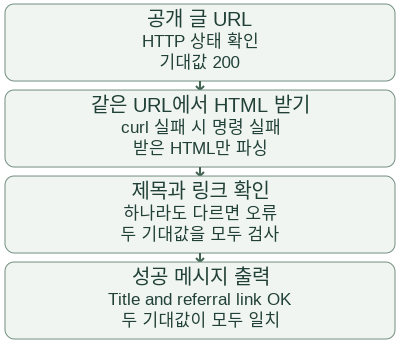
두 명령을 Bash에서 순서대로 실행합니다. 첫 명령은 HTTP 상태를 보여 주고, 다음 명령은 Python 3로 받은 HTML을 읽어 제목과 링크를 확인합니다.
먼저 글 주소의 HTTP 상태를 확인합니다. 이 예제에서는 200이 나와야 합니다.
post_url='https://youdozi.github.io/ko/posts/2026-11-29-spring-postgres-rollback/'
curl --silent --show-error --max-time 20 \
  --output /dev/null --write-out '%{http_code}\n' "$post_url"
그다음 같은 주소에서 HTML을 받아 <title>과 <a href>를 읽습니다. 이번 글에서는 제목에 PostgreSQL 스키마 변경 후 Spring Boot 앱을 롤백할 수 있을까?가 들어 있고, Gumroad 링크의 utm_content가 spring-postgres-rollback-ko인지 확인했습니다. 영어판은 spring-postgres-rollback-en이 기대값입니다. 다음 명령은 블로그 페이지만 요청하고, 외부 링크는 받은 HTML에서 읽습니다. 검증에 사용한 공개 글
set -o pipefail
curl --fail --silent --show-error --max-time 20 "$post_url" | python3 -c '
from html.parser import HTMLParser
from sys import stdin
from urllib.parse import parse_qs, urlsplit

class Post(HTMLParser):
    title = ""
    in_title = False
    expected_link = False

    def handle_starttag(self, tag, attrs):
        if tag == "title":
            self.in_title = True
        if tag == "a":
            link = urlsplit(dict(attrs).get("href") or "")
            if (link.hostname == "dozi3.gumroad.com"
                    and link.path == "/l/cldhfl"
                    and parse_qs(link.query).get("utm_content")
                    == ["spring-postgres-rollback-ko"]):
                self.expected_link = True

    def handle_endtag(self, tag):
        if tag == "title":
            self.in_title = False

    def handle_data(self, text):
        if self.in_title:
            self.title += text

post = Post()
post.feed(stdin.read())
if "PostgreSQL 스키마 변경 후 Spring Boot 앱을 롤백할 수 있을까?" not in post.title:
    raise SystemExit("Unexpected page title")
if not post.expected_link:
    raise SystemExit("Expected referral link missing")
print("Title and referral link OK")
'
공개 한국어판에서 실행하니 Title and referral link OK가 출력됐습니다. 배포가 성공했는데 글 주소가 404라면 먼저 언어 경로와 슬러그를 확인하세요. 200이면서 제목이 다르면 응답 본문을 열어 의도한 글이 내려왔는지 확인하면 됩니다.
댓글