How to verify a new post is live after a GitHub Pages deployment
A passing PR build shows that the site can be generated. To check whether the merged post went live, find the deployment run for main and fetch the new article at the URL readers will open. Checking the title and an important link also catches cases where the wrong page returns HTTP 200. GitHub Pages custom workflow documentation
Find the deployment run by merge commit
When I published the Spring Boot rollback post, I merged the PR and found the run for merge commit 8d2e3a9 in GitHub Actions. Both build / build and deploy succeeded in that run, and I then checked the public URLs of the Korean and English editions separately. If there are several runs, use the commit to find the right one. Deployment record
Check the title and link in the public HTML
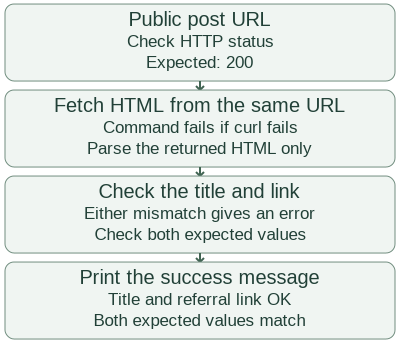
Run the two commands in Bash in the order shown. The first displays the HTTP status. The second uses Python 3 to read the returned HTML and check the title and link.
First, check the HTTP status of the post URL. This example should return 200.
post_url='https://youdozi.github.io/ko/posts/2026-11-29-spring-postgres-rollback/'
curl --silent --show-error --max-time 20 \
  --output /dev/null --write-out '%{http_code}\n' "$post_url"
Next, fetch the HTML from the same URL and read the <title> and <a href> elements. I checked that the title contained “PostgreSQL 스키마 변경 후 Spring Boot 앱을 롤백할 수 있을까?” and that the Gumroad link’s utm_content was spring-postgres-rollback-ko. The expected value for the English edition is spring-postgres-rollback-en. The command below requests only the blog page and reads the external link from the returned HTML. Public post used for the check
set -o pipefail
curl --fail --silent --show-error --max-time 20 "$post_url" | python3 -c '
from html.parser import HTMLParser
from sys import stdin
from urllib.parse import parse_qs, urlsplit

class Post(HTMLParser):
    title = ""
    in_title = False
    expected_link = False

    def handle_starttag(self, tag, attrs):
        if tag == "title":
            self.in_title = True
        if tag == "a":
            link = urlsplit(dict(attrs).get("href") or "")
            if (link.hostname == "dozi3.gumroad.com"
                    and link.path == "/l/cldhfl"
                    and parse_qs(link.query).get("utm_content")
                    == ["spring-postgres-rollback-ko"]):
                self.expected_link = True

    def handle_endtag(self, tag):
        if tag == "title":
            self.in_title = False

    def handle_data(self, text):
        if self.in_title:
            self.title += text

post = Post()
post.feed(stdin.read())
if "PostgreSQL 스키마 변경 후 Spring Boot 앱을 롤백할 수 있을까?" not in post.title:
    raise SystemExit("Unexpected page title")
if not post.expected_link:
    raise SystemExit("Expected referral link missing")
print("Title and referral link OK")
'
Running the example against the public Korean edition printed Title and referral link OK. If the deployment succeeded but the post URL returns 404, start by checking the language path and slug. If it returns 200 with a different title, open the response body to see which post was served.
Discussion