GitHub Pages पर डिप्लॉयमेंट के बाद कैसे जाँचें कि नई पोस्ट लाइव है
PR का बिल्ड पास होने से पता चलता है कि साइट जनरेट की जा सकती है। यह जाँचने के लिए कि मर्ज की गई पोस्ट सार्वजनिक हो गई है, main का डिप्लॉयमेंट रन देखें और उस URL से नई पोस्ट सीधे प्राप्त करें जिसे पाठक खोलेंगे। शीर्षक और एक महत्वपूर्ण लिंक की जाँच से ऐसे मामले भी पकड़ में आते हैं जिनमें कोई दूसरा पेज HTTP 200 लौटाता है। GitHub Pages के कस्टम वर्कफ़्लो का दस्तावेज़
मर्ज कमिट से डिप्लॉयमेंट रन ढूँढें
जब मैंने Spring Boot रोलबैक की पोस्ट प्रकाशित की, तो PR मर्ज करने के बाद GitHub Actions में मर्ज कमिट 8d2e3a9 से जुड़ा रन ढूँढा। उस रन में build / build और deploy दोनों सफल रहे। फिर मैंने कोरियाई और अंग्रेज़ी संस्करणों के सार्वजनिक URL अलग-अलग जाँचे। अगर कई रन दिखें, तो सही रन ढूँढने के लिए कमिट का इस्तेमाल करें। डिप्लॉयमेंट का रिकॉर्ड
सार्वजनिक HTML में शीर्षक और लिंक जाँचें
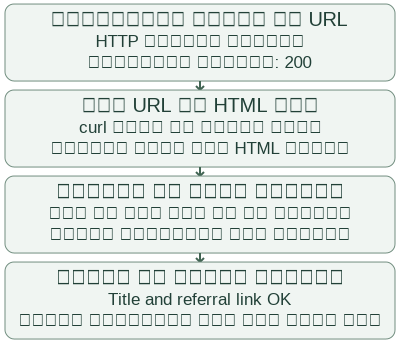
Bash में दोनों कमांड दिए गए क्रम में चलाएँ। पहली कमांड HTTP स्टेटस दिखाती है। दूसरी Python 3 की मदद से मिला हुआ HTML पढ़कर शीर्षक और लिंक जाँचती है।
पहले पोस्ट के URL का HTTP स्टेटस देखें। इस उदाहरण में 200 मिलना चाहिए।
post_url='https://youdozi.github.io/ko/posts/2026-11-29-spring-postgres-rollback/'
curl --silent --show-error --max-time 20 \
  --output /dev/null --write-out '%{http_code}\n' "$post_url"
फिर उसी URL से HTML लें और <title> और <a href> पढ़ें। मैंने जाँचा कि शीर्षक में “PostgreSQL 스키마 변경 후 Spring Boot 앱을 롤백할 수 있을까?” था और Gumroad लिंक का utm_content मान spring-postgres-rollback-ko था। अंग्रेज़ी संस्करण का अपेक्षित मान spring-postgres-rollback-en है। नीचे दी गई कमांड सिर्फ़ ब्लॉग पेज का अनुरोध करती है और बाहरी लिंक मिले हुए HTML से पढ़ती है। जाँच में इस्तेमाल की गई सार्वजनिक पोस्ट
set -o pipefail
curl --fail --silent --show-error --max-time 20 "$post_url" | python3 -c '
from html.parser import HTMLParser
from sys import stdin
from urllib.parse import parse_qs, urlsplit

class Post(HTMLParser):
    title = ""
    in_title = False
    expected_link = False

    def handle_starttag(self, tag, attrs):
        if tag == "title":
            self.in_title = True
        if tag == "a":
            link = urlsplit(dict(attrs).get("href") or "")
            if (link.hostname == "dozi3.gumroad.com"
                    and link.path == "/l/cldhfl"
                    and parse_qs(link.query).get("utm_content")
                    == ["spring-postgres-rollback-ko"]):
                self.expected_link = True

    def handle_endtag(self, tag):
        if tag == "title":
            self.in_title = False

    def handle_data(self, text):
        if self.in_title:
            self.title += text

post = Post()
post.feed(stdin.read())
if "PostgreSQL 스키마 변경 후 Spring Boot 앱을 롤백할 수 있을까?" not in post.title:
    raise SystemExit("Unexpected page title")
if not post.expected_link:
    raise SystemExit("Expected referral link missing")
print("Title and referral link OK")
'
सार्वजनिक कोरियाई संस्करण पर उदाहरण चलाने से Title and referral link OK दिखाई दिया। अगर डिप्लॉयमेंट सफल है, लेकिन पोस्ट का URL 404 लौटाता है, तो पहले भाषा का पथ और स्लग जाँचें। अगर 200 मिलता है लेकिन शीर्षक अलग है, तो रिस्पॉन्स बॉडी खोलकर देखें कि कौन-सी पोस्ट लौटी है।
चर्चा