如何确认 GitHub Pages 部署后的新文章已上线
PR 构建通过,说明网站可以正常生成。要确认合并后的文章是否已经公开,请查看 main 的部署运行记录,再从读者将访问的网址直接获取新文章。连同标题和重要链接一起检查,还能发现返回 HTTP 200 的其实是其他页面的情况。GitHub Pages 自定义工作流文档
通过合并提交找到部署运行记录
发布 Spring Boot 回滚文章时,我先合并 PR,然后在 GitHub Actions 中找到合并提交 8d2e3a9 对应的运行记录。那次运行的 build / build 和 deploy 都成功了,随后我分别检查了韩语版和英语版的公开网址。如果有多条运行记录,可以用提交来定位。实际部署记录
检查公开 HTML 中的标题和链接
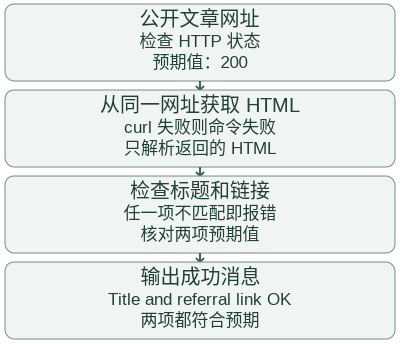
在 Bash 中按顺序执行以下两个命令。第一个命令显示 HTTP 状态。第二个命令用 Python 3 读取返回的 HTML,检查标题和链接。
先检查文章网址的 HTTP 状态。这个示例应该返回 200。
post_url='https://youdozi.github.io/ko/posts/2026-11-29-spring-postgres-rollback/'
curl --silent --show-error --max-time 20 \
  --output /dev/null --write-out '%{http_code}\n' "$post_url"
接下来,从同一网址获取 HTML,读取 <title> 和 <a href>。这次我检查了标题是否包含“PostgreSQL 스키마 변경 후 Spring Boot 앱을 롤백할 수 있을까?”,以及 Gumroad 链接的 utm_content 是否为 spring-postgres-rollback-ko。英语版的预期值是 spring-postgres-rollback-en。下面的命令只请求博客页面,外部链接从返回的 HTML 中读取。用于验证的公开文章
set -o pipefail
curl --fail --silent --show-error --max-time 20 "$post_url" | python3 -c '
from html.parser import HTMLParser
from sys import stdin
from urllib.parse import parse_qs, urlsplit

class Post(HTMLParser):
    title = ""
    in_title = False
    expected_link = False

    def handle_starttag(self, tag, attrs):
        if tag == "title":
            self.in_title = True
        if tag == "a":
            link = urlsplit(dict(attrs).get("href") or "")
            if (link.hostname == "dozi3.gumroad.com"
                    and link.path == "/l/cldhfl"
                    and parse_qs(link.query).get("utm_content")
                    == ["spring-postgres-rollback-ko"]):
                self.expected_link = True

    def handle_endtag(self, tag):
        if tag == "title":
            self.in_title = False

    def handle_data(self, text):
        if self.in_title:
            self.title += text

post = Post()
post.feed(stdin.read())
if "PostgreSQL 스키마 변경 후 Spring Boot 앱을 롤백할 수 있을까?" not in post.title:
    raise SystemExit("Unexpected page title")
if not post.expected_link:
    raise SystemExit("Expected referral link missing")
print("Title and referral link OK")
'
对公开的韩语版执行示例后,输出了 Title and referral link OK。如果部署成功,但文章网址返回 404,请先检查语言路径和 slug。如果返回 200,但标题不同,请打开响应正文,确认返回的是不是要找的文章。
讨论